Introduction to Firewalls
A firewall is a network security system (hardware or software) that acts as the first line of defense between internal systems and external networks. It forces all traffic through a single checkpoint where it monitors and controls incoming and outgoing data based on predefined rules.
lightbulb Real World Analogy
Think of a firewall as a Security Guard at a gated community or a club.
- check_circle The guard checks your ID (IP Address).
- check_circle They check if you are on the guest list (Allowed Ports/Protocols).
- check_circle If you look suspicious or carry weapons (Malware/Payload), they deny entry.
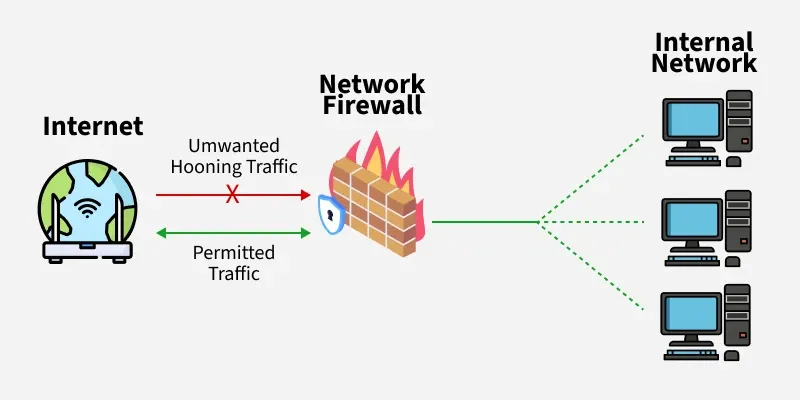
Firewall in Computer Network
traffic Core Logic: The 3 Decisions
science Live Simulation
Click a button to see how the firewall handles incoming packets based on different rules.
verified_user Why are Firewalls Essential?
-
lock
Prevent Unauthorized Access
Like a locked door, only trusted users are allowed in.
-
bug_report
Block Malicious Traffic
Stops viruses, phishing, and DoS attacks before they hit the system.
-
admin_panel_settings
Control Network Usage
Enforces workplace restrictions (e.g., blocking social media) or parental controls.
-
folder_shared
Protect Sensitive Data
Safeguards business and personal data from theft or accidental leaks.
-
visibility
Mitigate Insider Risks
Detects suspicious data exfiltration attempts from inside the network.
settings How it Works
-
1. Inspection
All data packets entering/leaving must pass through the firewall checkpoint.
-
2. Rule Check
It compares the packet against organization's predefined security rules.
-
3. Decision & Logging
Matches are Allowed/Blocked. Suspicious activity is logged and alerts are sent.
The "Default Policy" Concept
Since you can't write a rule for everything, a firewall needs a default action for unknown traffic.
Best Practice: Set Default Policy to DROP or REJECT. Only explicitly allowed traffic gets in.
Types of Firewalls
1. Network Placement
- Packet Filtering Firewall
- Stateful Inspection Firewall
- Proxy Firewall (App Level)
- Circuit-Level Gateway
- Web App Firewall (WAF)
- Next-Gen Firewall (NGFW)
2. Systems Protected
- Network Firewall: Protects the entire network.
- Host-Based Firewall: Installed on a single computer/server (e.g., Windows Firewall).
3. Data Filtering
- Perimeter Firewall
- Internal Firewall
- Distributed Firewall
4. Form Factors
- Hardware: Physical appliance (e.g., Cisco ASA).
- Software: Installed program (e.g., pfSense, ZoneAlarm).
If asked by an interviewer:
"How does a firewall actually filter traffic?"
1. Packet Filtering (Stateless)
Basic. Checks header (IP/Port) against rules. No memory of context.
2. Stateful Inspection
Advanced. Remembers active connection states. If you requested data, the reply is automatically allowed.
Pro Answer Tip: Mention Default Policy (Drop/Reject) and Next-Generation Firewalls (NGFW) which inspect Layer 7 (Application) data to block specific apps like Facebook Games.