The Traffic Cop of the Internet
Imagine a busy intersection with no traffic lights. Cars (requests) come from everywhere, trying to get to a single destination. Without management, you get gridlock.
A Load Balancer is like a smart traffic cop standing at the entry point. It directs each car to the least crowded lane (server), ensuring everyone moves smoothly and no single lane gets overwhelmed.
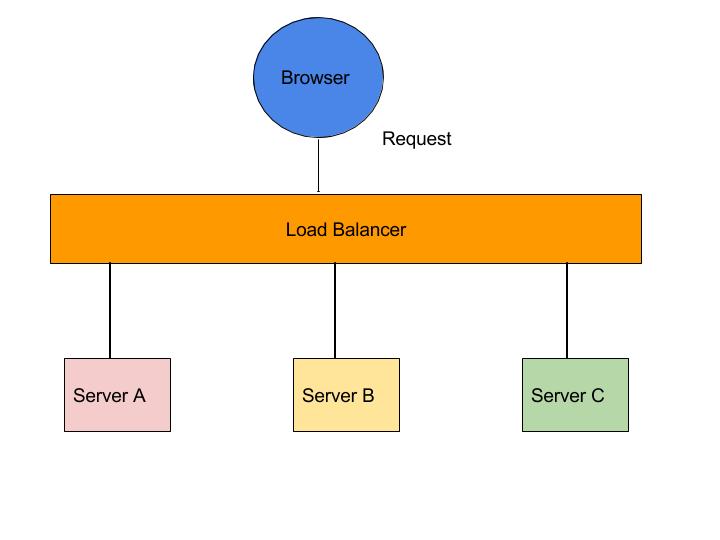
Load Balancing
Technical Architecture
How requests flow from client to server through the load balancing layer.
layers Layer 4 (Transport Layer)
Works at the TCP/UDP level. It directs traffic based on IP address and port data. It's extremely fast because it doesn't inspect the packet content.
Example: TCP Load Balancing
http Layer 7 (Application Layer)
Works at the HTTP level. It can make smarter decisions based on URL, headers, or cookies (e.g., sending all `/images` traffic to a specific media server).
Example: Nginx Reverse Proxy
Live Load Balancer Simulator
Visualize how different algorithms distribute traffic.
Interview Cheat Sheet
Q: What is the difference between Load Balancer and Reverse Proxy? expand_more
- Load Balancer: Focuses on distributing traffic among multiple servers to increase availability and reliability.
- Reverse Proxy: Sits in front of servers to provide security, anonymity, and centralization (SSL termination, caching), even if there's only one backend server.
Note: Nginx is technically a reverse proxy that functions excellently as a load balancer.
Q: Explain "Sticky Sessions" (Session Persistence). expand_more
Why? If you store session data (like a shopping cart) in the server's local memory, switching servers would cause the cart to disappear.
Drawback: Can lead to uneven load distribution if one server gets stuck with many heavy users.
Q: How does a Load Balancer know a server is down? expand_more
- Passive: Monitors real traffic. If users get 500 errors, the server is flagged.
- Active: The LB periodically pings a specific endpoint (e.g., `/health`) on the server. If it doesn't get a 200 OK response, it stops sending traffic there until it recovers.