CICD (Jenkins) Basics
What is DevOps?
-
DevOps is a software development approach which involves Continuous Development, Continuous testing, Continuous Integration, Continuous Deployment and Continuous Monitoring throughout its development lifecycle.
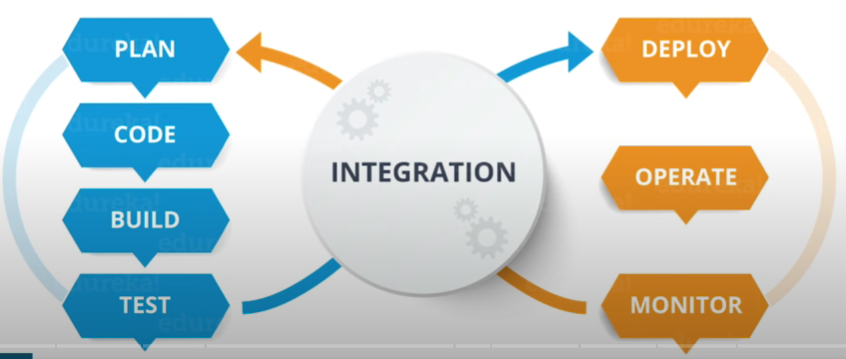
DevOps Stages
-
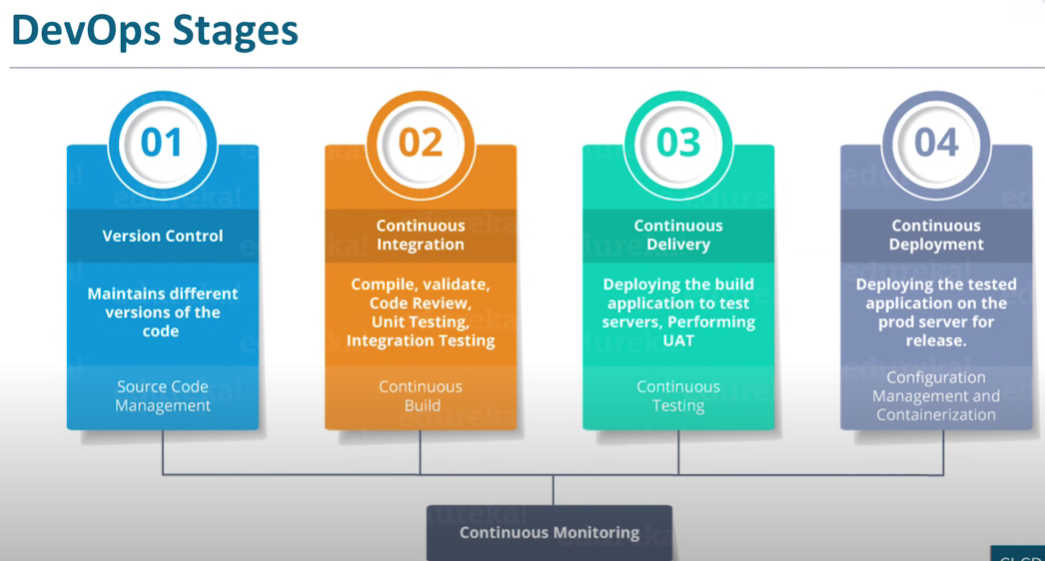
There are 4 stages:
-
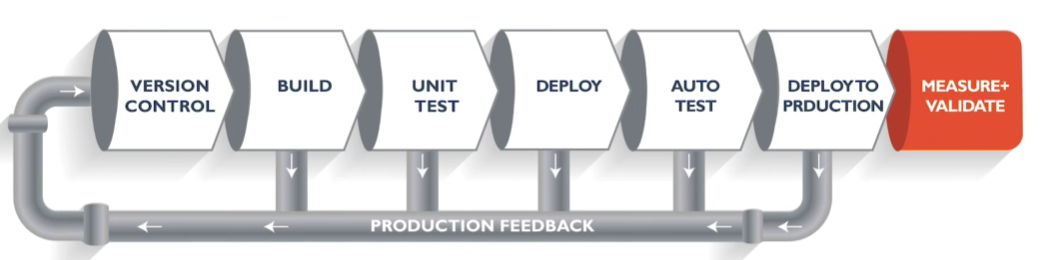
Pipeline is a logical step or a series of steps which define how software development lifecycle occurs
-
Integration means putting all the code together from all the contributing developers and then merging the code and building it as whole.
-
We call it continuous integration because everything happens in DevOps continuously.
-
For Creating Pipeline in Jenkins we can have 3 jobs:
- To build the project
- To test the project
- To deploy the project
What is CI and CD?
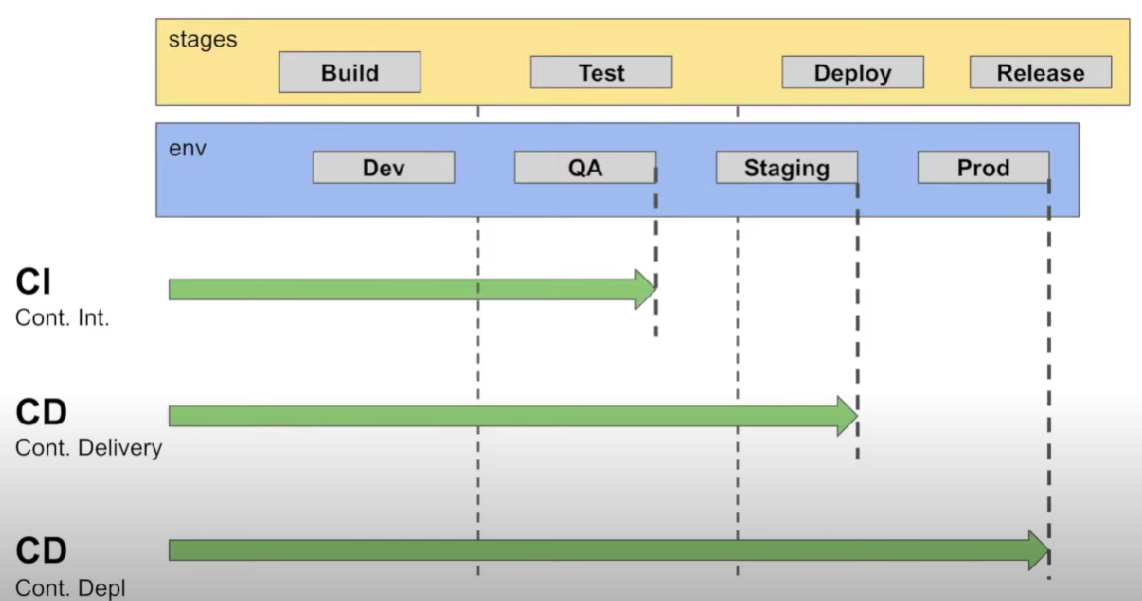
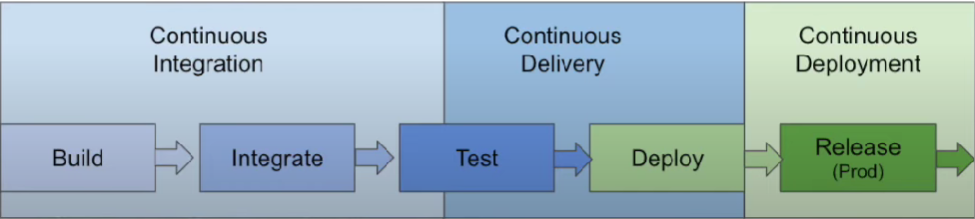
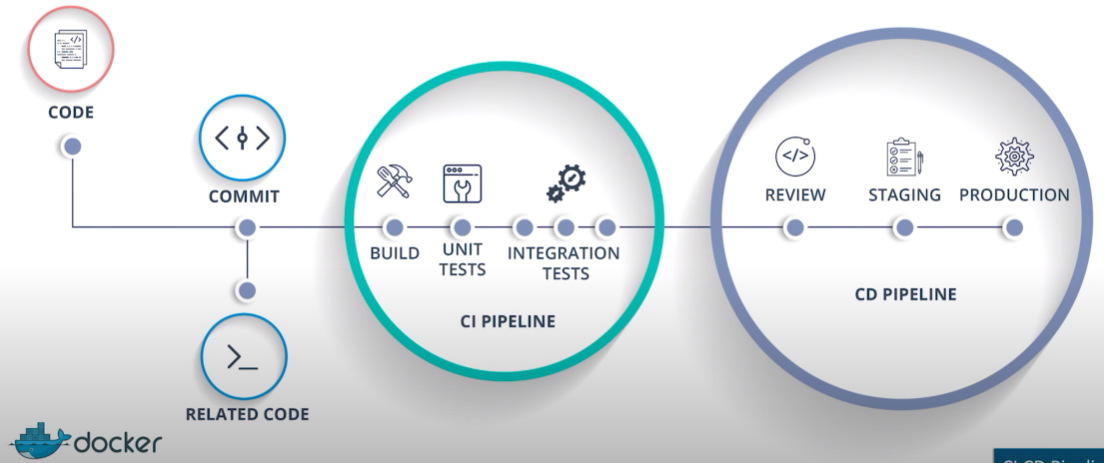
- CI/CD, which stands for continuous integration (CI) and continuous delivery (CD)
CI - Continuous Integration :
- A process where team members integrate their work continuously in a shared repository. Best achieved using some SCM tools like GIT.
- Can be daily or as needed Every integration or check-in in the repo is validated by automated build, automated by unit or integration tests
CD - Continuous Delivery :
- After the CI process, Deploying on a Prod like env and running automation tests to ensure the build is ready for release.
-
Ensure the build is always in a Deployment state.
-
Pre-prod or staging environment: exactly same as prod env, to make sure anything not crash in prod env, first deploy change in pre-prod/staging env.
CD - Continuous Deployment :
- Automated Deployment to Prod. Every change that passes through Automation Tests is deployed to Production
Jenkins - The ultimate CI Tool
-
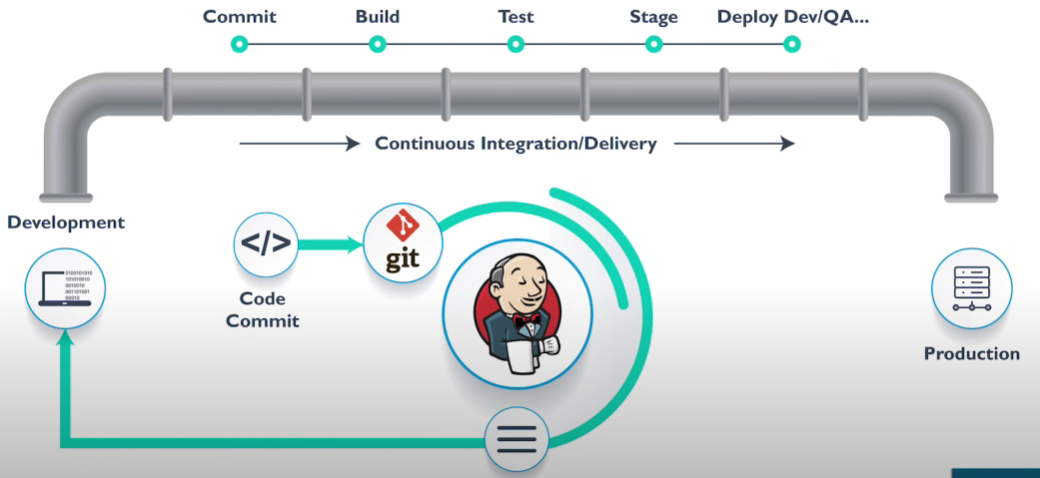
Jenkins is an open source automation tool written in Java with plugins built for Continuous Integration purpose. Plugins allows integration of various DevOps stages.
-
Jenkins is a tool for continuous integration, Jenkins role is only till the application is packaged, now if it has to be delivered then we need some tools to deliver that product.
-
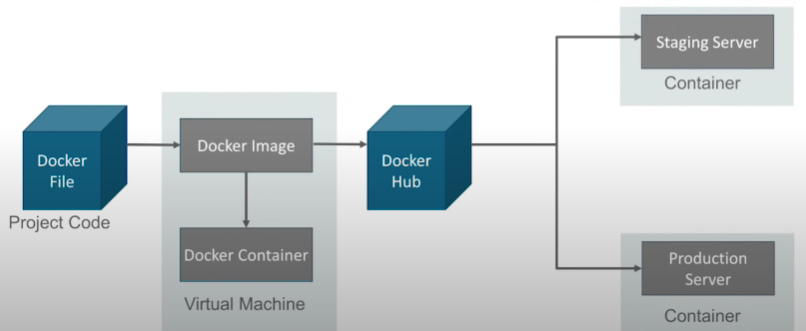
Once the product/software moves on to the staging server to deploy it, we need tools like docker.
-
Installing Jenkins on Windows : https://github.com/LinkedInLearning/learning-jenkins-3003221/tree/01_02
- Need to install Java (OpenJDK), Git, before installing Jenkins.
- Plugins: A software package that extends Jenkins' core functionality.
What is Docker
- Docker file builds a Docker image and that image contains all the project's code
- We can run that image to create as many docker containers as we want
-
Then this Image can be uploaded on Docker hub, from Docker hub any one can pull the image and build a container
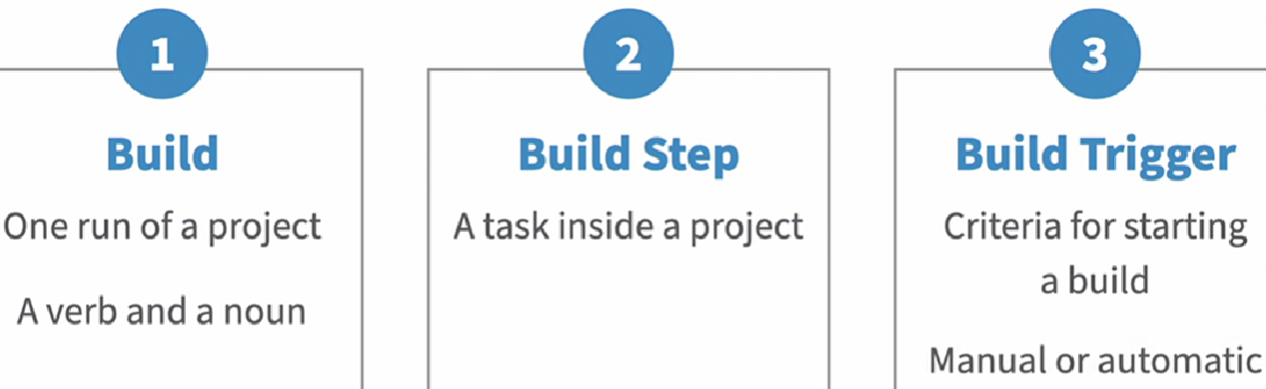
Project or Job
- A user-configured description of the work that Jenkins will manage.
-
Job and project used interchangeably
Artifacts
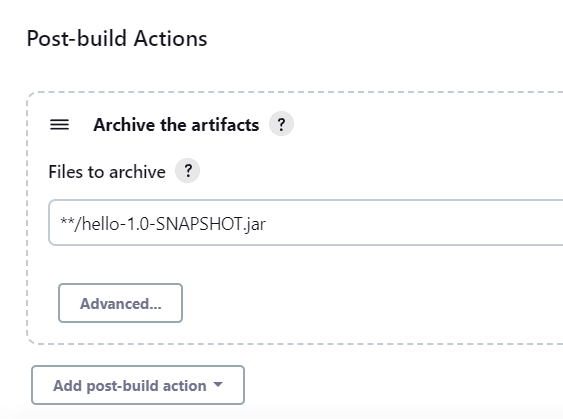
- Most jenkings jobs will generate some sort of products at the end of each build.
- It can be compiled executable like and .exe, an archive like a jar file or it might even be a report in the text file.
-
These products are referred to as artifacts.
-
**- this tells jenkins to search for the file in the workspace without giving the exact path. -
Parameters and environment variables :
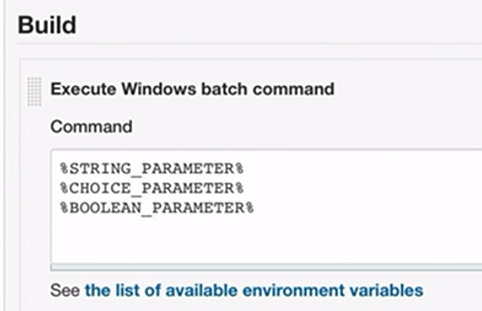
@echo off
@echo ENVIRONMENT = %ENVIRONMENT%
Scheduling Jobs :
- Updating software
- Monitoring system details
- Downloading and processing data
- Similar to Cron :
- A time-based job scheduler in Unix-like operating systems
- Jenkins uses a format similar to cron for scheduling jobs
- Execution times are defined by an expression representing the schedule
Jenkins Scheduler Format& Aliases :
- Jenkins Scheduler Format is as follows:
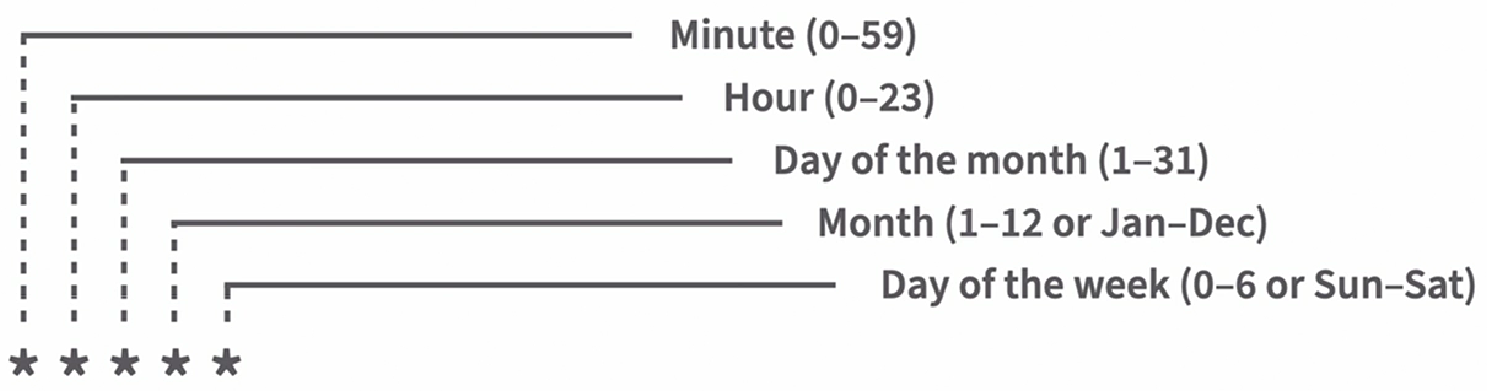
- Use H for hashed values to spread out jobs around the desired time
- Use simple aliases for general times
- @hourly
- @daily
- @midnight (To run any time after 12AM and before 3AM)
- @weekly
- @annualy
Time Zones :
- Time zones are relative to the server
- Many servers use the Universal Time, UTC time zone
- If our Local time and the server time are different, make sure we account for that in our schedule.
- Plan your schedule accordingly
Views and Folder :
Views :
- Views provide a way of associating jobs on the dashboard and displaying them together.
- Views display jobs that meet a criteria
- Views are like a filter
- If we delete a view, all content inside will remain as it is.
Folders :
- Folders allow us to create structures that are very similar to file systems on a disk
- Folders group things together
- Folders contain jobs, views, and other folders
- Folders provide a namespace that is separate from other folders in jenkins
- If we delete a folder, all content inside will also got deleted.
Pipelines :
- Jenkins also allows us to configure jobs as code (instead of Jenkins user interface).
- These types of jobs are called pipelines.
- Stored in a file named Jenkinsfile
- Can be versioned in a code repository
- Configure Jenkins jobs
-
Contain stages and steps
-
Pipeline stages: Stages are sections of the pipeline
pipeline { stages{ stage ('Build') { Steps { Echo "Checking out code…" } Steps { Echo "Compiling code…" } } stage ('Test') { } stage ('Deploy') { } } }- Each stage must have a step, like build stage can have pull code from git
- Steps are the actions to take