System Design For Beginners
1) Why Study System Design?
Toy Apps vs. Real Apps: A simple setup (one server + one database) works for college projects, but it fails in the real world.
The Scale Problem: When you have millions of users, a basic architecture cannot handle the traffic and will crash.
What System Design Solves: It teaches you how to build systems that are:
- Scalable: Can handle growth from 10 users to 10 million.
- Reliable: Won't crash completely just because one part fails (Fault Tolerance).
- Secure: Protects user data from attacks.

A Client isn't just a person; it refers to any interface sending a request. This includes React websites, Android apps, iOS apps, or any device a user interacts with.
So, in one line we can say: "System Design is the process of architecting real-world applications that remain scalable, reliable, and secure enough to handle traffic from millions of users without crashing."
2) What is a Server?
- It’s just a computer: A server is simply a physical machine (like our laptop) where application code runs.
- Localhost: When you run an app on your own computer, you use
localhost(IP Address127.0.0.1). This is your local server. - IP Address: Every server has a unique logical address called an IP Address (think of it like a phone number for computers).
How a Website Loads (The Process)
DNS Lookup: When you type a website name (e.g., rk.com), a system called DNS translates that name into the server's specific IP Address.
Request Sent: Your browser sends a request to that IP Address.
Finding the App (Ports): A server runs many apps at once. A Port (like 443 for HTTPS) acts like a specific door to tell the server which app you want to access.

Note: Humans use domain names (rk.com) because remembering numbers (35.154.33.64) is too difficult.
What is Deployment?
- The Problem: To let others see your app, your computer needs a Public IP. Managing this on your own physical hardware is difficult and unreliable.
- The Solution (Cloud Providers): Instead of using your own laptop, you rent a "Virtual Machine" from providers like AWS, Azure, or GCP.
- In AWS, this rented machine is called an EC2 Instance.
- Deployment Defined: Deployment is simply the act of moving your application code from your local laptop onto that rented cloud server so the public can access it.
3) Latency and Throughput
1. Latency (Speed)
- What it is: The time it takes for one single request to go to the server and come back.
- Think of it as: Speed or Delay.
- Measurement: usually measured in milliseconds (ms).
- The Rule: You want Low Latency.
- Low Latency: Fast (e.g., website loads instantly).
- High Latency: Slow (e.g., website lags or spins).
- RTT (Round Trip Time): Another term often used for Latency. It specifically means the total time for the round trip (To Server + Back to You).
2. Throughput (Capacity)
- What it is: The amount of work or number of requests a system can handle at the same time (per second).
- Think of it as: Volume or Traffic Capacity.
- Measurement: Requests Per Second (RPS) or Transactions Per Second (TPS).
- The Rule: You want High Throughput.
- High Throughput: The server can handle thousands of users at once without crashing.
- Low Throughput: The server gets overwhelmed easily with just a few users.
3. The Highway Analogy
- To understand the difference instantly, imagine a highway:
- Latency: How long it takes for one car to travel from Point A to Point B (e.g., 10 minutes).
- You want this time to be short.
- Throughput: How many total cars can pass through the highway in one hour (e.g., 1,000 cars).
- You want this number to be high.
Summary
- Latency = Time for one (Speed).
- Throughput = How many at once (Capacity).
- Ideal System = Low Latency (Fast) + High Throughput (Can handle everyone).
4) Scaling and its types
Scaling is simply upgrading your system to handle more users without crashing.
- The Problem: When too many people visit a website at once, it can "hang" or crash (just like a cheap phone freezes when playing a heavy game).
- The Solution: We "scale" the system to make it stronger and capable of handling more traffic.
There are two main ways to do this:
1. Vertical Scaling (Scale Up)
Think of this as upgrading your current machine.
- How it works: You increase the power of the single server you already have.
- What you change: You add more RAM, a faster CPU, or more Storage.
- Best for: Databases (SQL) and applications that need to keep specific data saved in one place.
- The Limit: You cannot upgrade forever. Eventually, you hit a limit where you can't add more power to a single machine.
2. Horizontal Scaling (Scale Out)
Think of this as adding more machines to help out.
- How it works: Instead of making one machine stronger, you simply buy more machines to share the work.
- The Strategy: If you have 1,000 users, you split them so that several different computers handle the requests.
- Preferred Method: This is the most common method in the real world because you can keep adding machines infinitely.
The Role of the Load Balancer
When you use Horizontal Scaling, you need a "Traffic Cop" called a Load Balancer.
- The Problem: Users (Clients) don't know which machine to connect to.
- The Solution: Users connect to the Load Balancer.
- How it works: The Load Balancer looks at the incoming traffic and sends it to the server that is currently least busy. This ensures no single machine gets overwhelmed.

Quick Comparison
| Feature | Vertical Scaling | Horizontal Scaling |
|---|---|---|
| Concept | Make the machine stronger. | Add more machines. |
| Analogy | Replacing a small engine with a Ferrari engine. | Hiring 10 people to do the job of 1. |
| Limit | Hard limit (tech has a max capacity). | No limit (just keep buying more machines). |
| Traffic | Handled by one super-computer. | Distributed by a Load Balancer. |
4.2) Request Lifecycle: From Client to Task
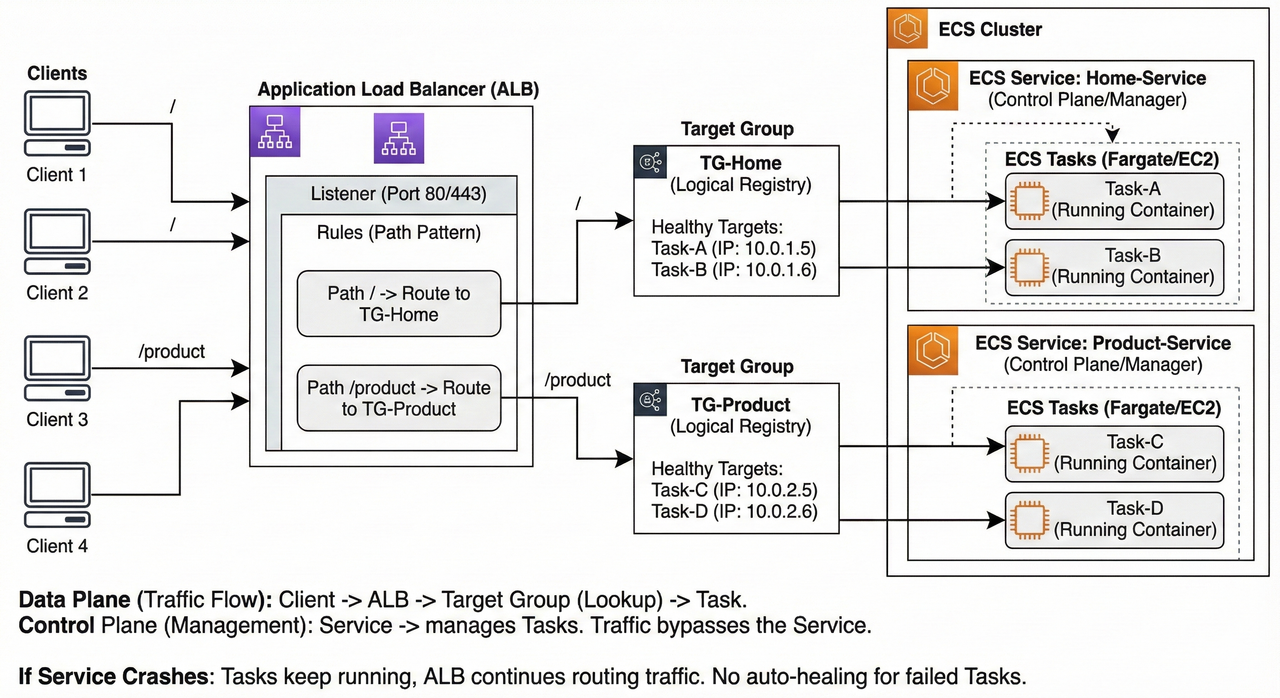
Scenario: A client requests www.myapp.com/product.
1. Client to Load Balancer (The Entry Point)
The journey begins when the user hits the URL.
- DNS Resolution: The client (browser) resolves the domain name to the public IP address of the Load Balancer (ALB).
- Listener Check: The request hits the ALB's "Listener" (usually on Port 80 or 443).
- Rule Evaluation: The ALB acts as a traffic router. It inspects the HTTP headers and the path of the request.
- It checks its configured rules: "If the path is
/product, forward to TG-Product." - Since the path matches, the ALB proceeds to select a target from that specific group.
- It checks its configured rules: "If the path is
2. Load Balancer to Target Group (The Selection)
It is crucial to understand that the Target Group is not a physical server or a hop in the network. It is a logical registry or a database.
- Lookup: The ALB looks at the registry for
TG-Product. - Health Check: It asks, "Which IP addresses in this group are currently 'Healthy'?"
- Selection: The Target Group returns a list of healthy IPs (e.g., Task A at
10.0.0.5and Task B at10.0.0.6). - Algorithm: Using a routing algorithm (like Round Robin), the ALB selects one specific IP (e.g.,
10.0.0.5) to handle this specific request.
3. The Role of the "Service" (The Control Plane)
- Important Note: The "Service" does NOT participate in the active request flow.
- The Manager: The Service functions as a manager/supervisor. Its job was to launch the tasks and register their IPs into the Target Group before the request ever arrived.
- Out of Path: The traffic does not pass "through" the Service. The Service ensures the infrastructure exists, but it does not touch the data packets.
- Analogy: The Service is like the HR department that hired the employee. The Customer (Client) talks directly to the Employee (Task), not to HR.
4. Load Balancer to Task (The Handshake)
Once the ALB has selected the specific IP address from the Target Group:
- Forwarding: The ALB opens a connection directly to the Task/Container (e.g.,
1-product-instanceat10.0.0.5). - Processing:
- The Task receives the request.
- The application logic executes (database queries, calculations).
- The Task generates a response (HTML, JSON).
5. Task to Client (The Return)
- The Task sends the response back to the Load Balancer.
- The Load Balancer forwards the response back to the Client.
Summary of Roles
| Component | Role | Description |
|---|---|---|
| Client | Requester | Initiates the traffic. |
| Load Balancer | Router | Inspects the request rules and selects the destination. |
| Target Group | Directory | A logical list of available, healthy IP addresses/Ports. |
| Service | Supervisor | Control Plane Only. Ensures the correct number of Tasks are running and registers them in the Target Group. Does not handle active traffic. |
| Task | Worker | The actual computing unit (Container/VM) that processes the logic. |
Key Takeaway for Architecture Design
If our Service crashes (the management logic fails), our application will stay online as long as the Tasks are still running. This is because the Load Balancer talks directly to the Tasks (via the Target Group registry), not to the Service.
The Catch: However, since the "Manager" (Service) is down, the system enters an unmanaged state. If a specific Task fails or crashes during this time, no replacement Task will be started because the auto-healing mechanism is broken. You lose the ability to self-heal until the Service is restored.
Click here to see Simulator to understand it better
5) Auto Scaling
Think of this as "Smart Automation" for your servers.
- Definition: A system that automatically increases or decreases the number of servers (EC2 instances) based on current traffic.
- Goal: To ensure the website never crashes during high traffic, while saving money during low traffic.
The Problem: Unpredictable Traffic
Imagine running a shop where the number of customers changes wildly every day.
- Scenario:
- Day 1: You have 10,000 users (Need 10 servers).
- Day 2: You have 100,000 users (Need 100 servers).
- The Expensive Mistake: If you keep 100 servers running all the time just to be safe, you are wasting money on the days when only 10 are needed.
The Solution: Dynamic Scaling
Instead of guessing, Auto Scaling adjusts the numbers for you in real-time.
- When Traffic is High: The system detects heavy load and automatically launches new servers to help.
- When Traffic is Low: The system detects idleness and automatically shuts down extra servers to save money.
How It Works (The Trigger)
You set a rule (a threshold) for the system to follow.
- The Rule: "If the CPU usage of a server goes above 90%, start a new server."
- The Result: You don't have to manually watch the screen. The system scales itself up and down instantly.
Key Takeaway
- Without Auto Scaling: You pay for maximum capacity all the time (Expensive).
- With Auto Scaling: You only pay for what you actually use at that moment (Efficient).
6) Back-of-the-envelope Estimation
This is a fancy way of saying "Rough Math done quickly."
- Goal: To quickly guess how much storage and how many servers you need before building a system.
- Time Limit: In interviews or planning, spend only about 5 minutes on this.
- Technique: Use round numbers and approximations to keep calculations simple (e.g., round 400 up to 500).
1. The Cheat Sheet (Memorize This)
To calculate fast, you need to know how "Powers of 2" (computer math) translate to real-world numbers.
| Power of 2 | Approx Value | Power of 10 | Short Name | Full Name |
|---|---|---|---|---|
| 10 | 1 Thousand | 3 | 1 KB | Kilobyte |
| 20 | 1 Million | 6 | 1 MB | Megabyte |
| 30 | 1 Billion | 9 | 1 GB | Gigabyte |
| 40 | 1 Trillion | 12 | 1 TB | Terabyte |
| 50 | 1 Quadrillion | 15 | 1 PB | Petabyte |
2. Real-World Example: Twitter
Let's calculate the needs for a Twitter-like app using three steps: Load, Storage, and Resources.
A. Load Estimation (Traffic)
First, calculate how many people are doing things (Reading vs. Writing).
- Daily Active Users (DAU): 100 Million users.
- Writes (Posting Tweets):
- If 1 user posts 10 tweets/day.
- 100 Million * 10 = 1 Billion tweets per day.
- Reads (Viewing Tweets):
- If 1 user reads 1,000 tweets/day.
- 100 Million * 1,000 = 100 Billion reads per day.
B. Storage Estimation (Hard Drive Space)
Next, calculate how much space these tweets take up every day.
- Tweet Size: Average tweet is 500 bytes (rounded up).
- Photo Size: Average photo is 2 MB.
- Assumption: Only 10% of tweets have photos.
The Math:
- Text Storage: 1 Billion tweets * 500 bytes = ~0.5 TB (approx 1 TB for ease).
- Photo Storage: 100 Million photos * 2 MB = 200 TB (Wait, let's look at the rough math in the prompt: 2MB * 500 Million was the approximation used there, resulting in 1 PB).
- Total Daily Storage: 1 PB (Petabyte) per day.
(Note: In estimations, if one number (1 PB) is massive and the other (1 TB) is tiny, we just ignore the tiny one.)
C. Resource Estimation (Servers & CPUs)
Finally, calculate how many actual computers (servers) you need to buy.
- Traffic: Imagine we get 10,000 requests per second.
- Processing Time: It takes the CPU 10ms to process one request.
The Math:
- Total Work Needed: 10,000 requests * 10ms = 100,000 ms of work every second.
- Capacity of 1 CPU Core: A single core can do 1,000 ms of work in one second.
- Cores Needed: 100,000 / 1,000 = 100 Cores.
- Servers Needed: If 1 Server has 4 Cores...
- 100 Cores / 4 = 25 Servers.
Conclusion: We need to buy 25 Servers to handle this traffic.
Summary Checklist
- Load: How many users? (DAU)
- Storage: How much data per day? (Bytes)
- Resources: How many servers based on CPU time? (Hardware)
7) CAP Theorem
The CAP Theorem is a rule for Distributed Systems (systems where data is stored across multiple computers/servers). It states that you can only have two of the following three guarantees at the same time. You cannot have all three.
The Three Pillars (C-A-P)
Consistency (C), Availability (A) & Partition Tolerance (P)
1. Consistency (C)
- Definition: Everyone sees the exact same data at the same time.
- Analogy: If you update your bank balance on your phone, your laptop should show the new balance instantly. If it doesn't, the system is inconsistent.
2. Availability (A)
- Definition: The system always responds to requests, even if one server crashes.
- Analogy: If the ATM closest to you is broken, you can still withdraw money from another ATM. The system is still "Available" because it didn't stop working entirely.
3. Partition Tolerance (P)
- Definition: The system continues to work even if the communication line (network) between servers is cut.
- Analogy: If the internet cable connecting the US office and the India office gets cut, the system keeps running instead of freezing.
The "Impossible" Triangle
The theorem says you can't have C, A, and P all together. You must choose a combination:
- CA (Consistency + Availability): Only possible if your system is on just one computer. In the real world of distributed systems (like Google or Facebook), this is impossible because network cables (Partitions) inevitably break.
- CP (Consistency + Partition Tolerance): "I will stop working rather than show you the wrong data."
- AP (Availability + Partition Tolerance): "I will keep working and show you data, even if it might be slightly old."
The Real World Choice: CP vs. AP
Since networks always break eventually, Partition Tolerance (P) is mandatory. You can't avoid it. So, your real choice is between Consistency or Availability.
Option 1: CP (Consistency First)
- Philosophy: "It is better to be down than to be wrong."
- Scenario: A network failure happens. The system blocks users from making changes until the network is fixed to ensure no errors occur.
- Use Case: Banking & Payments. (You never want to see the wrong account balance, even for a second.)
Option 2: AP (Availability First)
- Philosophy: "It is better to remain online, even if the data is slightly delayed."
- Scenario: A network failure happens. The system lets users keep posting and liking things, knowing the data will sync up later when the network is fixed.
- Use Case: Social Media. (If a "Like" count on a post is off by 5 for a few minutes, nobody gets hurt.)
Summary Table
| Strategy | Primary Goal | Trade-off | Best For |
|---|---|---|---|
| CP | Data Accuracy | System might go offline during network issues. | Banks, Stock Trading |
| AP | Always Online | Data might be slightly out of sync temporarily. | Facebook, TikTok, Twitter |
8) Scaling of Database
What is Database Scaling?
- The Problem: At first, one database server handles everything. As we get more users, it slows down or crashes.
- The Goal: Upgrade our system to handle more traffic without breaking.
- The Golden Rule: Don’t over-engineer. Scale step-by-step. Don't build for 10 million users if we only have 10k.
1. Indexing (Making Reads Faster)
- Without Indexing: The database looks at every single row to find data (like reading every page of a book to find a word). This is slow
O(N). - With Indexing: The database creates a "shortcut" list (like the index at the back of a book). It jumps straight to the data.
- How it works: It uses a structure called a B-tree to sort data, allowing it to search extremely fast
O(log N). - Effort: very low. We just add one line of code; the database handles the rest.

2. Partitioning (Splitting Tables)
- The Concept: Break one huge table (e.g., "Users") into smaller tables (e.g., "user_table_1", "user_table_2", "user_table_3").
- Location: All these small tables still live on the same server.
- Benefit: Smaller tables mean smaller index files, which keeps searching fast.
- Smart Querying: You don't need to change your code much; modern databases (like PostgreSQL) are smart enough to find the right table automatically.

3. Master-Slave Architecture (Splitting Workload)
- When to use: When our single server can't handle the traffic anymore.
- The Setup: We use multiple servers.
- Master Node: Handles all Writes (Insert, Update, Delete).
- Slave Nodes: Handle all Reads (Select).
- Data Flow: We write to the Master. The Master copies that data to the Slaves (replication). When we want to read data, you ask the Slaves.

4. Multi-Master Setup (Scaling Writes)
- When to use: When one Master node is overwhelmed by too many write requests.
- The Setup: We have two or more Master nodes.
- Example: One Master for North India, one for South India. They sync data with each other periodically.
- The Challenge: Conflicts. If two people change the same data on different servers at the same time, we have to write complex code to decide which version to keep.
5. Database Sharding (The Advanced Step)
- Warning: This is complex. Avoid it unless absolutely necessary.
- The Concept: Similar to partitioning, but instead of keeping tables on one server, you split them across different servers (called Shards).
- Sharding Key: This is the specific column (like User ID) we use to decide which server gets which data. Ideally, this key distributes data evenly so no single server gets overloaded.

Why is Sharding Hard?
- Manual Work: Unlike Partitioning (where the database handles the routing), we have to write code in your application to tell it which server to check.
- Example: "If User ID is 1-100, go to Server A. If 101-200, go to Server B."
- Complex Joins: If we need to combine data from Server A and Server B, it is very slow and expensive.
- Consistency: Keeping data perfectly in sync across different servers is hard.
Common Sharding Strategies:
- Range-Based: IDs 1–1000 go to Shard 1; IDs 1001–2000 go to Shard 2. (Easy, but some servers might get fuller than others).
- Hash-Based: Uses a math formula on the ID to pick a Shard . (Evenly distributes data, but hard to add new servers/shards later).
HASH(user_id) % number_of_shardsdetermines the shard.
- Geographic: Users from America go to Shard 1; Europe goes to Shard 2. (Good for speed, but one region might get too busy).
- Directory-Based: You keep a "map" or lookup table that tells you exactly where every piece of data is. (Flexible, but the map itself can slow things down).
- A lookup table maps
user_idranges to shard IDs.
- A lookup table maps
Sum Up: The Rules of Database Scaling
If we remember nothing else, remember this order of operations:
- Vertical Scaling (First Choice): Always try this first. Just buy a bigger, stronger computer (more RAM/CPU). It requires the least effort.
- Master-Slave (Read-Heavy): If our site is slow because too many people are reading data, use this to split the work.
- Sharding (Write-Heavy): If we have too much data to fit on one machine, or too many people writing data at once, use sharding.
- Note: This is the last resort because it is complex.
9) SQL vs NoSQL Databases and when to use which Database
1. SQL Databases (Relational)
Think of these like an Excel spreadsheet with strict rules.
- Structure: Stores data in tables with rows and columns.
- Fixed Schema: Wemust define the structure (what columns exist) before adding data. We can't just throw in a random new field for one entry.
- Focus: Priorities ACID properties (Accuracy, Consistency, Isolation, Durability) to ensure data is 100% reliable.
- Examples: MySQL, PostgreSQL, Oracle.
2. NoSQL Databases (Non-Relational)
Think of these like a flexible file folder where you can drop different types of documents.
- Structure: Flexible. You can add new fields on the fly without changing the whole system.
- Focus: Prioritizes speed, scalability, and flexibility over strict consistency.
- The 4 Main Types:
- Document: Stores data like JSON files (e.g., MongoDB).
- Key-Value: Simple pairs like a dictionary (e.g., Redis, AWS DynamoDB).
- Column-Family: Good for massive data analysis (e.g., Apache Cassandra).
- Graph: Best for connecting relationships, like friends on social media (e.g., Neo4j).
3. How They Scale (Growing the System)
- SQL (Vertical Scaling): To handle more traffic, we upgrade the single server to be more powerful (more RAM, better CPU). Think of it as making a single car faster and bigger.
- NoSQL (Horizontal Scaling): To handle more traffic, we add more servers to the cluster. Think of it as buying more cars to carry more people.
Note: NoSQL uses Sharding (splitting data across servers) easily. SQL can do this, but it is complex and messy.
4. Cheat Sheet: When to Use Which?
Choose SQL (Relational) if:
- Data is Structured: We have clear, unchanging fields (e.g., Customer Accounts).
- Accuracy is Critical: We are dealing with money, transactions, or stock trading where errors are unacceptable (ACID is required).
- Complex Queries: We need to join many tables together or perform heavy data analytics.
Choose NoSQL (Non-Relational) if:
- Data is Unstructured: We have messy data like reviews, social media posts, or different product attributes.
- Speed & Scale: We have massive amounts of data (Big Data) or need real-time speed (e.g., Live driver location, likes/comments).
- Rapid Changes: Our data structure might change often as we develop the app.
9.2) ACID (Accuracy, Consistency, Isolation, Durability)
Think of ACID as the "safety rules" for databases. They guarantee that when you process data (like a payment), it happens reliably without errors or data loss.
1. Atomicity (All or Nothing)
- The Rule: A transaction is a single unit. Either every step happens successfully, or none of them do. There is no "half-done."
- How it works: If a process fails halfway (e.g., power cut), the database "rolls back" (undoes) everything to the start.
- Real-Life Example: Transferring money.
- We send $100 to a friend.
- If the system deducts $100 from us but fails to credit our friend, Atomicity cancels the deduction so we don't lose money.
2. Consistency (Follow the Rules)
- The Rule: The data must always follow the strict rules defined in the database.
- How it works: If a transaction tries to enter data that breaks a rule (like a negative age or a duplicate ID), the database rejects the whole thing.
- Real-Life Example: Account Balances.
- Rule: "Balance cannot be less than $0."
- If we have $10 and try to spend $20, the database blocks it to keep the data "Consistent."
3. Isolation (Don't Interfere)
- The Rule: Multiple transactions happening at the same time must not mess each other up. They should act as if they are happening one by one.
- How it works: The database uses "locks" on data rows so that two people can't edit the exact same thing at the exact same millisecond.
- Real-Life Example: Booking a Flight.
- Two people try to book the last seat at the exact same moment.
- Isolation ensures only one gets it, and the other sees "Sold Out."
4. Durability (Saved Forever)
- The Rule: Once the database says "Success," that data is saved permanently.
- How it works: The system writes the record to a hard disk log immediately. Even if the server catches fire 1 second later, the data is safe.
- Real-Life Example: distinct "Payment Successful" screen.
- Once we see that screen, our payment is recorded. Even if the bank's system crashes right after, our record will be there when it restarts.
Summary Table
| Property | Core Concept | Technical Mechanism |
|---|---|---|
| Atomicity | All or Nothing | Undo Logs (Reverses failures) |
| Consistency | Follow the Rules | Constraints (triggers/validators) |
| Isolation | Independent Execution | Locks (Queuing access) |
| Durability | Permanent Storage | Write-Ahead Logs (Saved to disk) |
Critical Note for System Design:
- Strict ACID rules make systems safer but slower.
- If we need massive speed and scale (like Facebook likes or Google search results), we might skip strict ACID and use NoSQL, which prefers speed over immediate consistency.
10) Microservices
1. Monolith (The "All-in-One" Approach):
- Think of this as a single, giant block.
- The entire application (user management, products, payments, etc.) is built as one unit.
- If we change one small thing, we often have to re-deploy the whole application.
2. Microservices (The "Lego" Approach):
- Think of this as breaking that giant block into small, separate pieces.
- The application is split into smaller, independent services.
- Example: An e-commerce app is split into a User Service, Product Service, Order Service, and Payment Service.
- Each service is a separate mini-application running on its own.
3. Why Choose Microservices?
- Targeted Scaling:
- If only the "Product Service" has high traffic, you can add more power (servers) just to that service. You don't need to upgrade the whole app.
- Tech Flexibility:
- We are not stuck with one coding language.
- We can write the User Service in NodeJS and the Order Service in Golang. Use the best tool for the job.
- Safety (Fault Isolation):
- In a Monolith, if one part crashes, the whole app often goes down.
- In Microservices, if the "Order Service" crashes, users can still browse products and log in because those services are separate.
4. When Should You Use It?
- Follow Team Structure:
- A popular rule is: "Microservices define our team structure."
- If we have 3 separate teams working on different features, we might have 3 microservices.
- Startups vs. Growth:
- Startups: Usually start with a Monolith because it's easier for a small team (2-3 people) to manage.
- Growth: As the company grows and hires more teams, they switch to Microservices to avoid stepping on each other's toes.
5. How Do Clients Connect? (The API Gateway)
Since every microservice sits on a different machine with a different IP address, it would be a nightmare for a client (like a mobile app) to keep track of them all.

- The Solution: API Gateway:*
- Imagine a receptionist at a large office building.
- The client sends all requests to one place (The API Gateway).
- The Gateway acts as the "receptionist" and routes the request to the correct service (e.g., sends a payment request to the Payment Service).
- Bonus Features of API Gateway:
- Security: Handles login checks before passing requests through.
- Rate Limiting: Prevents users from spamming the server.
- Caching: Remembers frequent answers to speed things up.
6. Summary Table
| Feature | Monolith | Microservice |
|---|---|---|
| Structure | Single, large unit | Many small, independent units |
| Scaling | Must scale the whole app | Scale only what is needed |
| Tech Stack | Single language for all | Can mix different languages |
| Failure | One crash kills everything | One crash isolates to that part |
11) Load Balancer Deep Dive
1. Why Do We Need a Load Balancer?
When we grow our application using horizontal scaling (adding more machines), we end up with many servers to handle requests.
- The Problem: We cannot give our clients a long list of different IP addresses for every server and ask them to pick one. That would be confusing and inefficient.
- The Solution: We use a Load Balancer.
- It acts as a single point of contact (like a receptionist) for our clients.
- Clients only need to know the Load Balancer's address.
- The Load Balancer receives the request and cleverly redirects it to the server that is least busy or best suited to handle it.

2. How Do We Choose the Right Server? (Algorithms)
To decide which specific server gets the next request, our Load Balancer follows a set of rules called algorithms.
Here are the four main types we use:
1. Round Robin Algorithm
- How it works: We treat all servers equally and take turns.
- If we have Server 1, 2, and 3, the requests go: 1 → 2 → 3 → 1 → 2 → 3...
- The Good: It is very simple to build and works well if all our servers are identical.
- The Bad: It ignores the health of the server. Even if Server 1 is overloaded, it still gets the next request when its turn comes.

2. Weighted Round Robin Algorithm
- How it works: This is like Round Robin, but we admit that some servers are stronger than others.
- We assign "weights" based on capacity (e.g., RAM or CPU).
- A powerful server gets more requests (e.g., 2 requests) for every 1 request a smaller server gets.
- The Good: Great when we have a mix of old and new servers with different power levels.
- The Bad: The weights are usually static (fixed). It doesn't account for whether a strong server is currently having a bad day (running slow).

3. Least Connections Algorithm
- How it works: We look at who is currently free.
- The Load Balancer checks which server currently has the fewest active connections (clients talking to it right now) and sends the new traffic there.
- The connection here can be anything like HTTP, TCP, WebSocket etc.
- The Good: It balances the load based on what is actually happening in real-time.
- The Bad: It can get tricky if some connections take a long time (like a big download) while others are very quick.
4. Hash-Based Algorithm
- How it works: We want the same user to always visit the same server.
- We take the client's unique info (like their IP address or User ID) and use a formula (hashing) to map them to a specific server.
- Every time that specific client visits, they go to the exact same place.
- The Good: Perfect for "session persistence" (keeping a user logged in without needing to save session data everywhere).
- The Bad: If we add or remove a server, the math changes, and users might get bounced to a new server, losing their session.