Essential Fundamentals
How Computer Works
Computer works on binary number system. Because it's based on electronic, and in electronic, signals are low or high which means 0 or 1.
Number Systems
- Binary = {0, 1}
- Octal = {0, 1, 2, 3, 4, 5, 6, 7}
- Decimal = {0, 1, 2, 3, 4, 5, 6, 7, 8, 9}
- HexaDecimal = {0, 1, 2, 3, 4, 5, 6, 7, 8, 9, A, B, C, D, E, F}
| Decimal | Binary | Octal | HexaDecimal |
|---|---|---|---|
| 0 | 0 | 0 | 0 |
| 1 | 1 | 1 | 1 |
| 2 | 10 | 2 | 2 |
| 3 | 11 | 3 | 3 |
| 4 | 100 | 4 | 4 |
| 5 | 101 | 5 | 5 |
| 6 | 110 | 6 | 6 |
| 7 | 111 | 7 | 7 |
| 8 | 1000 | 10 | 8 |
| 9 | 1001 | 11 | 9 |
| 10 | 1010 | 12 | A |
| 11 | 1011 | 13 | B |
| 12 | 1100 | 14 | C |
| 13 | 1101 | 15 | D |
| 14 | 1110 | 16 | E |
| 15 | 1111 | 17 | F |
| 16 | 10000 | 18 | 10 |
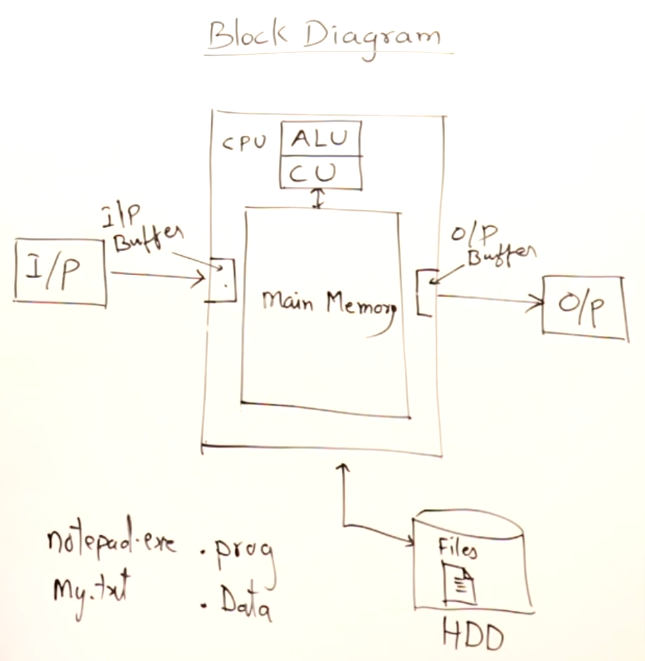
- Computer is a programmable computation device.
- A Program contains Data and set of Instructions.
- Intermediate language between human language and machine language is called programming language.
Low-level, High-Level & Hybrid Languages
-
Low level language :
- Machine Language (Binary)
- Assembly
-
High level languages :
- C, C++, Java, Python, C#, etc
- Compiler bases languages : C++
- Interpreter based languages : Javascript
- Hybrid languages
-
Hybrid Languages :
- Java, dot net languages - C#
- They have both compiler and interpreter.
- It's 2 step stages.
- Compiler just check for error, not generate machine code, it's just byte code. JVM (interpreter) will generate machine code and also execute.
- Interpreter for byte code not for source code.
Compiler vs Interpreter
-
Compiler :
- Compiler converts source code to machine code (only if no error).
- Generate executable file.
- For running program we don’t require compiler.
- Compiler programs are faster, run independently.
-
Interpreter :
- Chrome works is an interpreter for java script.
- Chrome translate one line and execute it also.
- Line by line translation as well execution.
- Will not create exe file.
- Interpreter languages are easier compared to compiler based languages.
- Example : Preparing a Chinese dish from reading a Chinese recipe book.
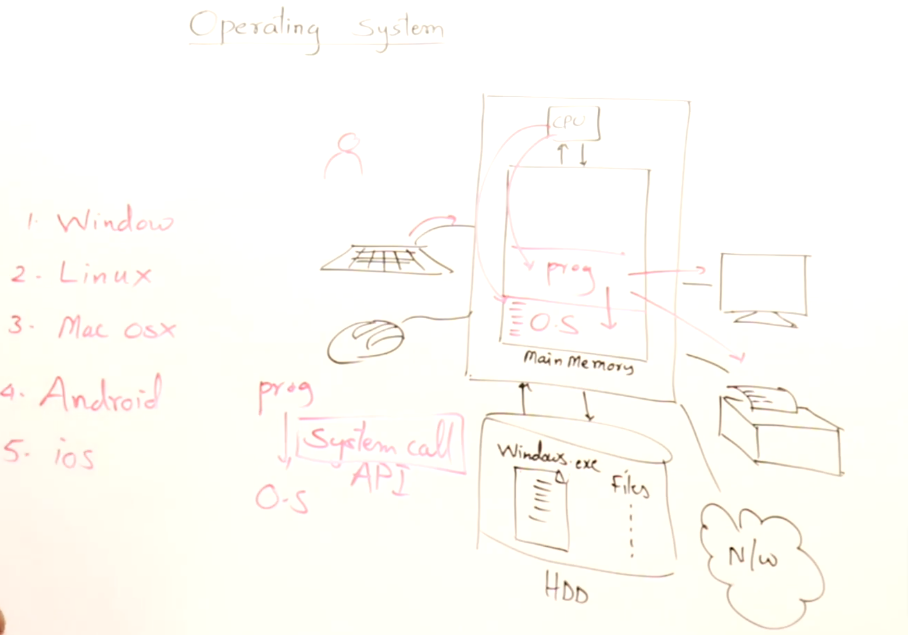
Operating System : A Master Program
Program Development
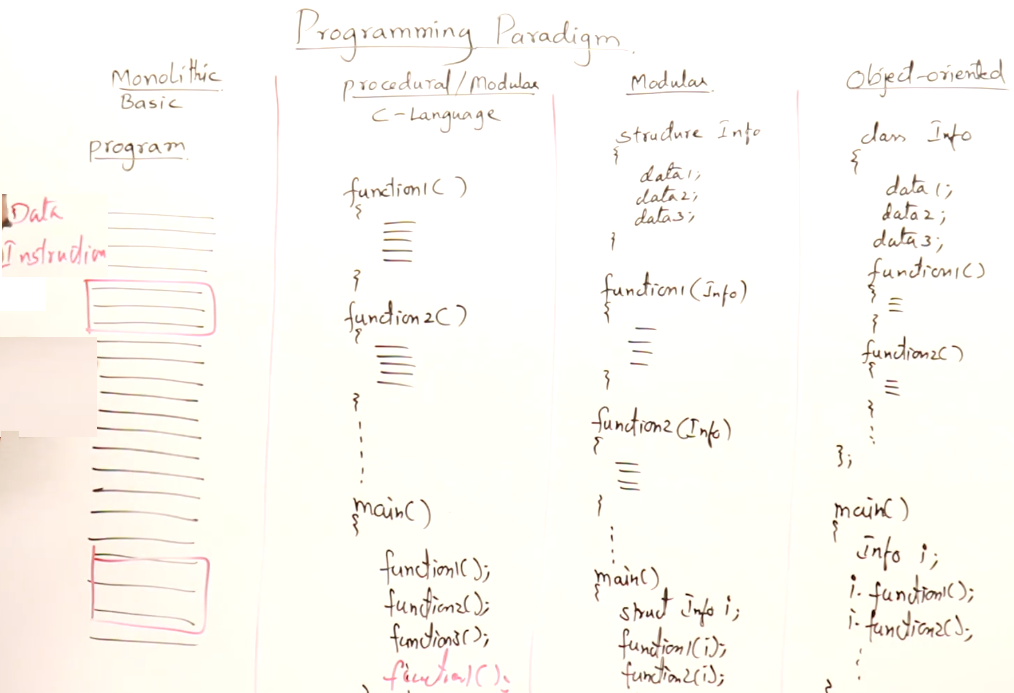
Programming Paradigm
- There are many type of Programming Paradigm, like Imperative, procedural, functional, declarative, object oriented, etc.
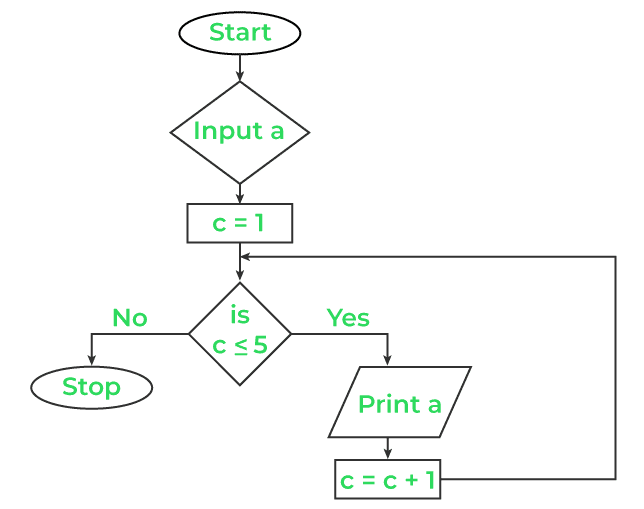
Flow Chart
- A flowchart is a type of diagram that represents a workflow or process.
- A flowchart can also be defined as a diagrammatic representation of an algorithm.
- It's a step-by-step approach to solving a task.
- Example :
Steps for Program Development and Execution
- Coding/Editing
- Compiling
- Linking Library (Header Files)
- Loading (Bringing program from hard disk to main memory)
- Execution
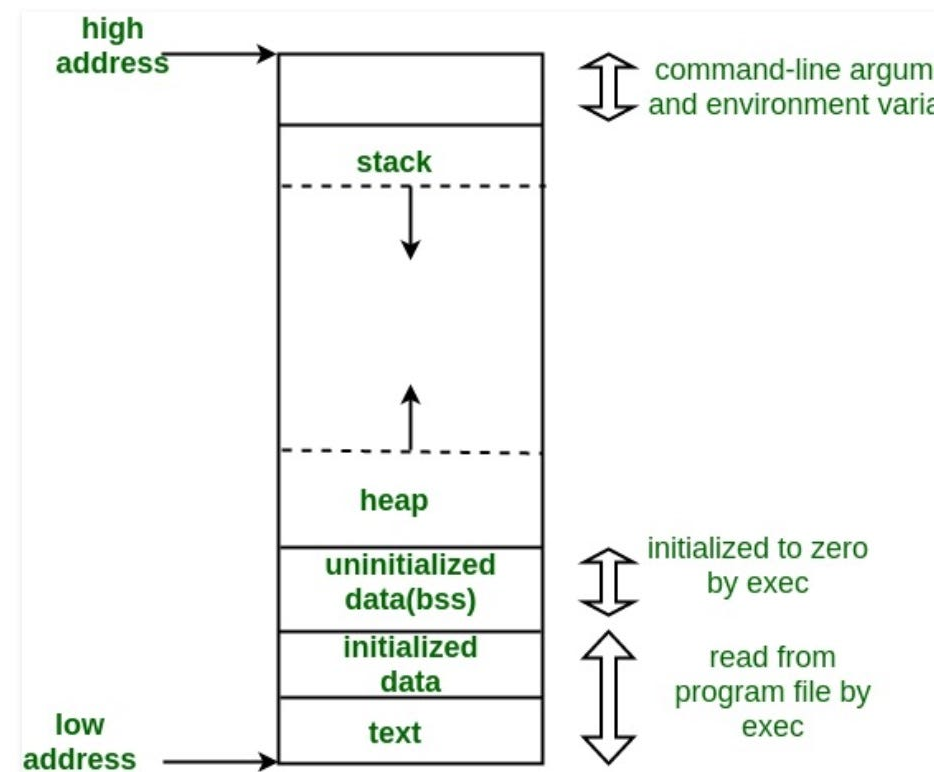
Main Memory divided into 4 sections
-
Stack :
- Used to store local variables and function call information
- Each function call creates a new stack frame, and local variables are allocated within that frame.
- Memory allocated on the stack is automatically reclaimed when a function exits.
-
Heap :
- Used for dynamic memory allocation
- Memory allocated on the heap persists until explicitly deallocated by the programmer.
-
Code Section (Text Section) :
- Machine code copied into code section.
- Holds the executable code of a program.
-
Data Section :
- Contains global and static variables used by the program
- Initialized Data Section :
- Holds initialized global and static variables.
- The values of these variables are set at compile time.
- Uninitialized Data Section (BSS - Block Started by Symbol) :
- Holds uninitialized global and static variables.
- The values of these variables are initialized to zero during program startup.
cpp
int initializedVariable = 42;   // Goes to the Initialized Data Section
int uninitializedVariable;      // Goes to the BSS Section