Pointers
- Pointer is a type of variable that store memory address.
- We have 2 types of variables :
- Data variables (used for storing data): -
int x = 10;
- Address variable (used for storing address):
int *p; p = &x;
- A pointer variable points to a data type (like int or string) of the same type, and is created with the
* operator.
Declaration
- To declare a pointer, we use the * (asterisk) symbol.
int* ptr; // Declaration of an integer pointer
Initialization
- Pointers should be initialized with the address of a variable or with the
nullptr (null pointer) if they are not pointing to anything initially.
int x = 10; int* ptr = &x; // Initialization with the address of 'x'
Dereferencing
- To access the value stored at the memory address pointed to by a pointer, we use the
* operator. This is known as dereferencing.
int y = *ptr; // 'y' now holds the value at the memory location pointed by 'ptr'
Size of Pointer
- The size of a pointer depends on the architecture of the system.
- Generally, on 32-bit systems, a pointer is typically 4 bytes, and on 64-bit systems, a pointer is usually 8 bytes.
- This is because the size of a pointer is related to the memory address space of the system. A 32-bit system has a 32-bit address space, and a 64-bit system has a 64-bit address space.
- Therefore, a pointer needs to be large enough to hold an address within that address space.
- We can use the
sizeof operator to determine the size of a pointer on a particular system.
int* ptr; sizeof(ptr);- Size of a pointer is independent of its data type.
int *p1; or float *p2 or char *p3 all takes 8 bytes in latest compilers or 4 bytes.
Modify Pointers
- We can also change the pointer's value. But this will also change the value of the original variable
string food = "Pizza";
string* ptrFood = &food;

*ptrFood = "Burger";    // Change the value of the pointer
cout << food;   // Burger
Pointers Example
// pointers.cpp

int x = 10;

int* ptr;   // Declaration of an integer pointer
ptr = &x;   // Initialization with the address of 'x'

// We can also initialize as int* ptr = &x;

cout << "x = " << x << endl;        // 10
cout << "&x = " << &x << endl;      // Address of x
cout << "ptr = " << ptr << endl;    // Address of x
cout << "&ptr = " << &ptr << endl;  // Address of ptr
cout << "*ptr = " << *ptr << endl;  // 10

int y = *ptr;   // Dereferencing
cout << "y = " << y << endl;        // 10

string food = "Pizza";
string* ptrFood = &food;

*ptrFood = "Burger";    // Change the value of the pointer
cout << "food = " << food << endl;   // Burger

cout << "sizeof(ptr) = " << sizeof(ptr) << endl;    // 4
cout << "sizeof(*ptr) = " << sizeof(*ptr) << endl;    // 4 (size of int datatype)

// Pointer size will remain same irrespective of datatype
char *ptrChar;
cout << "sizeof(ptrChar) = " << sizeof(ptrChar) << endl;    // 4
cout << "sizeof(*ptrChar) = " << sizeof(*ptrChar) << endl;    // 1 (size of char datatype)
Why Pointers?
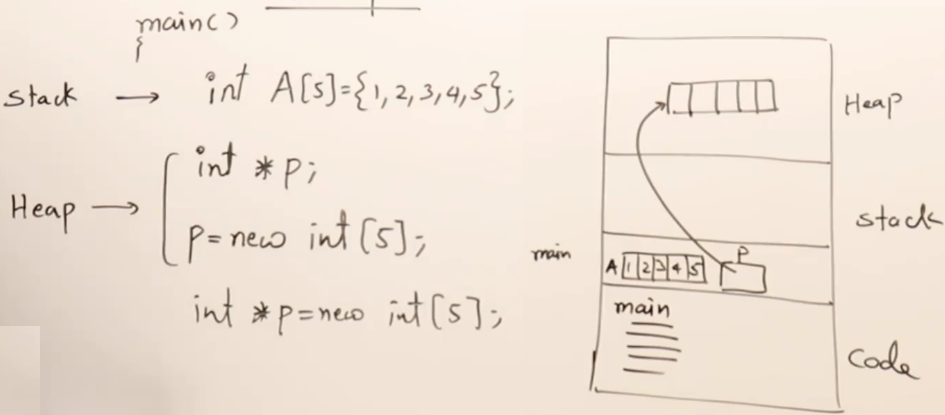
- A program can only access code section and stack directly. Pointers help it to access heap section.
- A pointer is in stack but it's stored address is in heap. So indirectly it helps us to access heap section.
- Here are some use cases of pointers:
- To access heap memory
- To access to file using file pointer
- To access network connections
- To access devices: keyboard, mouse, printer, etc
- In Java and C# there are no direct pointers, so we can't access devices through programs, can access only using JVM or through common languages of run time in C#.
- Therefor there is no system programming in java and c#
Heap
- Dynamic memory
- Memory decide at run time not compile time
- Use new, memory created in heap
- Heap memory don't delete automatically until program is over
- Heap vs Stack:
Memory Leak
- We created a memory using
new and point it to a pointer ptr, but then we set ptr to null, but after that we don't have access to that memory.
- Therefore we need to free the memory (heap) first using
delete or free;
Delete []ptr;ptr = NULL;
Null Pointers
- Pointers can be set to
nullptr to indicate that they are not currently pointing to a valid memory location.
-
int* nullPtr = nullptr;
NULL vs nullptr:
NULL is used to indicate that a reference or variable doesn't point to any object or has no value.nullptr is used specifically for pointers to indicate a null or no-value state. It is considered safer than using NULL or 0 for null pointer assignments because it has a distinct pointer type and can be more type-safe. It was introduced in C++11.
Arrays, Pointers and Pointer Arithmetic
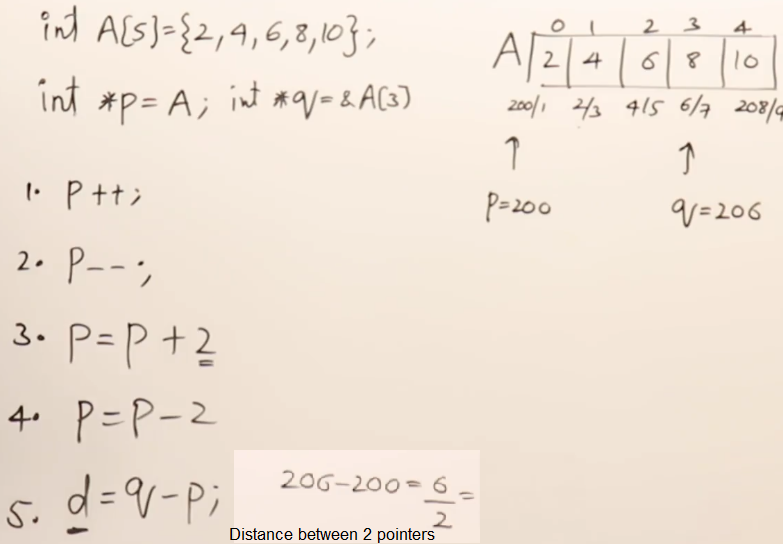
- We can perform arithmetic operations on pointers
- It involves moving the pointer to different memory locations based on the size of the data type it points to.
int arr[5] = {1, 2, 3, 4, 5};

// The name of an array is essentially a pointer to its first element.

int* arrPtr = arr;  // Points to the beginning of the array
int thirdElement = *(arrPtr + 2);   // Accessing the third element us
- The name of an array is essentially a pointer to its first element.
- In above example
arrPtr points to the first element of arr.
- Pointer Arithmetic operations:
-
- Pointer increment will move the pointer depending on the data type of pointer. int is 4 bytes so pointer will move by 4 bytes. if pointer is char type then it will move by 1 byte.
- Example:
// pointer_arithmetic.cpp

int arr[5] = {0, 1, 2, 3, 4};

int *ptr = arr;
int *ptr2 = &arr[3];

cout << "*ptr = " << *ptr << endl;          // 0
cout << "*ptr2 = " << *ptr2 << endl;        // 3

ptr++;
cout << "*ptr = " << *ptr << endl;          // 1
cout << "*ptr2 = " << *(ptr2 - 2) << endl;  // 1
cout << "*ptr2 = " << *(--ptr2) << endl;    // 2

int arr2[] = {0, 10, 20, 30, 40, 50, 60};

int *ptrArr2 = &arr2[3];  // ptrArr2 will be pointing on 30 at index 3
cout << "ptr[-2] = " << ptrArr2[-2] << endl; //  10 (p[-2] means 2 index backward)
Problems with Pointers
-
Uninitialized pointer:
- Created a pointer (int p) and then assign (p = 2.5) but pointer p is not pointing to any address
-
Memory leak:
- Delete memory before setting pointer to null
- NULL = 0 =
nullptr (nullptr used in modern c++. Recommended, it's an address).
-
Dangling Pointers:
- A pointer pointing to a location which is not exist (deleted/deallocated).
- Accessing or dereferencing such a pointer can lead to undefined behavior and potentially serious bugs in our program.
int* ptr = new int;     // Allocate dynamic memory

// Assume some operations with ptr

delete ptr;     // Deallocate the memory

// Now, ptr is a dangling pointer because it still holds the address of the deallocated memory
// Accessing or dereferencing the dangling pointer can lead to undefined behavior

cout << *ptr << endl;   // error
- To avoid dangling pointers, we can set the pointer to
nullptr or NULL after deallocating the memory:
ptr = nullptr; // Set the pointer to nullptr after deallocating the memory
Dynamic Memory Allocation
- Pointers are also used with dynamic memory allocation functions like
new and delete to allocate and deallocate memory at runtime.
int* dynamicPtr = new int;  // Allocating memory for an integer
*dynamicPtr = 42;           // Assigning a value to the allocated memory
delete dynamicPtr;          // Deallocating the memory
Function Pointers:
- Pointers can also be used to store the address of functions, enabling dynamic function invocation.
void myFunction(int x) {
    // Some code
}

void (*funcPtr)(int) = myFunction;  // Pointer to a function taking an integer argument
References
- Reference is nothing but a alias/nickname of a variable.
- Reference doesn't consume any memory.
- A reference variable is a "reference" to an existing variable, and it is created with the
& operator.
string food = "Pizza";  // food variable
string &meal = food;    // reference to food, must initialize at that time
- Declaration of reference variable requires an initializer.
string &meal = food;    // correct
string &meal;           // error
- We can't change reference again.
string &meal = food2; // this is not possible because it's already initialize as string &meal = food;- The reference meal can't reference any other value at all now.
- If we update data in reference variable
meal, it will also update actual variable food as both are pointing towards the same memory address.
- Example:
string food = "Pizza";
string food2 = "Burger";
string &meal = food;
// &meal = food2;      // error

cout << "&food = " << &food << endl;
cout << "&meal = " << &meal << endl;    // &food and &meal is exactly same

meal = "Cheese";    // this will also update food and both are pointing the same address

cout << "meal = " << meal << endl;      // Cheese
cout << "food = " << food << endl;      // Cheese

int x = 10;
int &y = x;     // y is a reference to x, it means x and y are 2 names of same variable
y = x + y;      // y = 10 + 10 = 20. y becomes 20, it means x also becomes 20
cout << "x = " << x << endl;    // 20

int var = 50;     // var is a variable
int* ptrVar = &var;    // ptrVar is a pointer variable, pointing to var
int* &ref = ptrVar;    // ref is a reference to a pointer variable, means ref is another name of ptrVar
// ptrVar & ref are 2 names of same pointer