Loops
-
If we need to output something 10 times, we need to write that same thing again & again 10 times. Here Loops make things easier for us.
-
Loops can execute a block of code as long as a specified condition is met.
- Loops are handy because they save time, reduce errors, and they make code more readable.
- There are mainly two types of loops :
Entry Controlled Loops
- The test condition is tested before entering the loop body.
- for loop & while loop
Exit Controlled Loops
- Test condition is tested or evaluated at the end of the loop body.
- Therefore, the loop body will execute at least once, irrespective of whether the test condition is true or false
- do-while loop
for loop
-
The
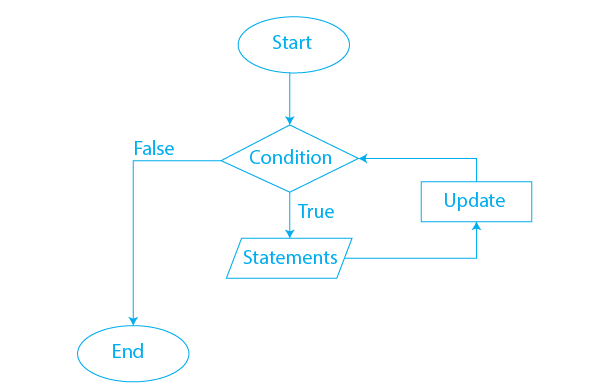
forloop is generally used when the number of iterations is known in advance. -
For Loop Flow Chart :
-
For loop is a counter-controlled loop.
- Usually for loop is written with counter.
for(int i = 0; i < n; i++)here i is a counter - for loop can be written like this for(;;)
while loop
-
The
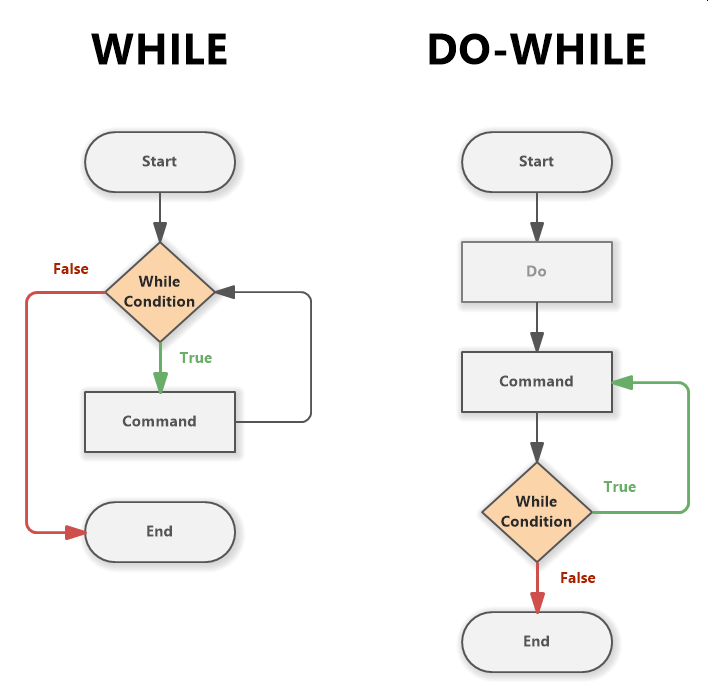
whileloop is generally used when the number of iterations is not known in advance, and it continues to execute as long as a specified condition is true. -
While & Do-While Loop Flow Chart :
do-while loop
- The do-while loop is similar to the while loop, but in the do-while loop the condition is tested at the end of the loop body.
-
It always executes the code block at least once, even if the condition is initially false.
Range-based for loop / for-each loop
- Range-based for loop has been added since C++ 11.
-
A convenient and concise way to iterate over elements in a range, such as an array, container, or any sequence of elements.
Break statement in loops
-
The
breakstatement can also be used to jump out of a loop.-// This program jumps out of the loop when i is equal to 4: for (int i = 0; i < 10; i++) { if (i == 4) { break; } cout << i << endl; }breakstatement can apply in other loops as well.
Continue statement in loops
-
The
continuestatement breaks one iteration (in the loop) if a specified condition occurs, and continues with the next iteration in the loop. -
continuestatement can apply in other loops as well.