Strings
- We have char array which is available in c & c++.
- We have class String which is only available in c++.
- Let's first understand char array:
Char Array
- Different ways of declaring and initializing string using char array:
// char_array.cpp char arr1 = 'a'; char arr2[10] = "Hello"; char arr3[] = "Hello"; char arr4[] = {'H', 'e', 'l', 'l', 'o', '\0'}; char arr5[] = {65, 66, 67, 68, 69, '\0'}; char *arr6 = "Hello"; // warning: ISO C++ forbids converting a string constant to 'char*' const char *arr7 = "Hello"; // to fix arr6 warning, add const cout << "arr1 = " << arr1 << endl; // a cout << "arr2 = " << arr2 << endl; // Hello cout << "arr3 = " << arr3 << endl; // Hello cout << "arr4 = " << arr4 << endl; // Hello cout << "arr5 = " << arr5 << endl; // ABCDE cout << "arr6 = " << arr6 << endl; // Hello cout << "arr7 = " << arr7 << endl; // Hello - Use Single Quotes for char
'' - use Double Quotes for string
"" - Declaring & Initializing String:
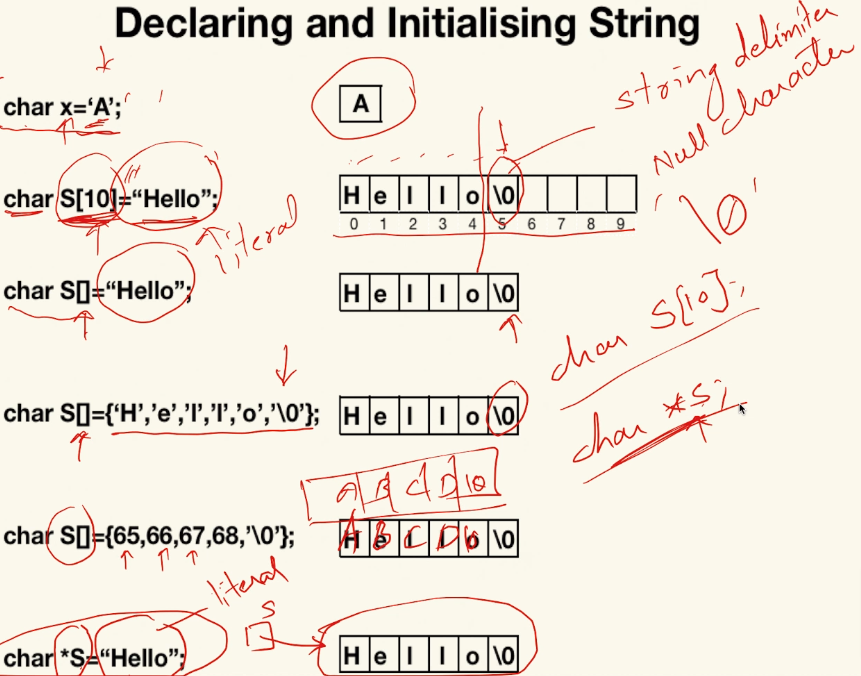
- Literals are created in code section.
- a literal is a notation for representing a fixed value in source code.
- literals can be used to represent constants of various types, such as integers, floating-point numbers, characters, and more
- If we want a string in heap, go for character pointer.
- If you want in stack, then go for character array.
- Null character =
'\0'(or 0 numeric) - just
cinonly takes characters to the first white space. cin.getline()reads input up to'\n'and stopscin.get()reads input up to'\n'and keeps'\n'in the streamcin.getline()reads a whole line, up to, but not including the Enter key.cin.get()is the same, except it keeps the newline character.- Example:
// char_array.cpp char name[20]; cout << "Enter name: "; cin >> name; // Reads until the first whitespace character, read only first word not whole sentence cout << "name = " << name << endl; // Rajat cin.ignore(); // to handle any leftover newline characters or other unwanted characters in the input buffer // cin.get() is used for accessing character array char data[20]; cout << "Enter Something for cin.get(): "; cin.get(data, 20); // get will not read enter key, second string will take that enter as '\n' string cout << "data = " << data << endl; // How are you? cin.ignore(); // to handle any leftover newline characters or other unwanted characters in the input buffer // `cin.getline()` reads input up to `'\n'` and stops (no need to use cin.ignore()) char data2[20]; cout << "Enter Something for cin.getline(): "; cin.getline(data2, 20); cout << "data2 = " << data2 << endl; // I am fine - This will also work:
Char Array/String built-in functions
-
Need to include
#include <ctring>or#include <string.h>'<cstring>'is the C++ version of the C header'<string.h>'. It is part of the C++ Standard Library and contains the same functions as, but they are encapsulated within the std namespace. So, when you use , you should use the std namespace or include it explicitly: '<string.h>'is the C version of the header and is typically used in C programs. If you are writing C++ code, it is generally recommended to use'<cstring>'for better compatibility with C++ and to take advantage of the std namespace.
-
strlen(s)// for string length strcat(destination, source)// for concatenate strings, source string will added in destination string, destination will become destination + source.strncat(destination, source, number of letter of second string to concatenate with first)// Concatenate with limited charactersstrcpy(destination, source)// copy source string to destinationstrncpy(destination,source, length)// Copy string with limited charactersstrstr(main, sub)// to find substring, will crash if not found. Use if(strstr(s1,s2)!=NULL) {…}strchr(main, char); // find occurrence of a character in stringstrcmp(str1, str2); // compare 2 string, return -ve, 0 (when strings are same), +vestrtol(str1, NULL, 10)// string to long int, where 10 (decimal) is basestrtof(str1, NULL)// string to floatstrtok(str1, "=;")// to tokenize a string, where =; is token/delimiter.- Working code with all above example is in
char_functions.cpp
Class String
- How to define a string:
string str
- Declaration and Initialization of String:
std::string newStr = "You are learning C++";
- How to input a string:
cin >> std// take only one wordgetline(cin, str)// can take sentence
String Class Functions / Operations on Strings
Input Functions:
getline(cin, str): store a stream of characters as entered by the userpush_back('c'): input a character at the end of the stringpop_back(): delete the last character from the string.
String Length:
str.size(): Returns the size of the stringstr.length(): Alias of size, returns the size of the stringstr.capacity(): Returns the capacity allocated to a string by the compilerstr.reserve(100): Changes the capacity of the string-
shrink_to_fit(): reduces the capacity of the string object to fit its actual lengthcout << "str1.size() = " << str1.size() << endl; cout << "str1.length() = " << str1.length() << endl; cout << "str1.capacity() = " << str1.capacity() << endl; str1.resize(100); cout << "str1.capacity() after str1.resize(100); = " << str1.capacity() << endl; str1.shrink_to_fit(); cout << "str1.capacity() after str1.shrink_to_fit() = " << str1.capacity() << endl;
String class provides a variety of member functions:
- Constructor:
- Assignment:
- Concatenation:
- Accessing Characters:
- Substring:
- Find:
- Replace:
- Erase:
- Compare:
- similar to strcmp, compare string in dictionary order and return result as -ve, 0, +ve.
- There are more functions in string class:
s.max_size()s.clear()s.empty()s.append( “Bye")s.insert(3,"kk" )s.insert(3, "Apple", 2)s.replace(3,5,"aa" )// 3 is starting index, 4 is length from starting index to replace with aas1.swap(s2)// swap 2 stringss.copy(char des[])// copy string char array des[]s.find(str) or char// to find occurrence of string or char and return indexs.rfind(str) // to find occurrence of string or char from end/right hand side and return index. If return index is greater than length of string it means it didn't find the string or chars.find_first_of('a', 3)// a character to find from last side and start finding from index 3 onwardss.find_last_of('le')// search from right hand side, will return index of any of character found first
Some operators defined upon string class:
str.at(5)// similar tostr[5]str.front()// return first character of stringstr.back()// return last character of string
Iterators
string::iterator// iterator object will work like a pointer to a character in a string (can read and modify)begin()end()reverse_iteratorrbegin()rend()-
Example: ```cpp // Part 1: Convert each character to uppercase using iterators string str1 = "today"; string::iterator it1; for (it1 = str1.begin(); it1 != str1.end(); it1++) { it1 = it1 - 32; // Convert to uppercase } cout << str1 << endl; // Output: TODAY
// Part 2: Print the reversed string string str2 = "today"; string::reverse_iterator it2; for (it2 = str2.rbegin(); it2 != str2.rend(); it2++) { cout << *it2; } cout << endl; // Output: yadot
// Part 3: Convert each character to uppercase using array indexing string str3 = "today"; for (int i = 0; str3[i] != '\0'; i++) { cout << str3[i]; // Output: today str3[i] = str3[i] - 32; // Convert to uppercase } cout << endl << str3; // Output: TODAY ```