Arrays
- An array is a collection of elements of the same data type, stored in contiguous memory locations.
- The elements in an array are accessed using an index, which starts from 0 for the first element.
- To declare an array :
- define the variable type,
- specify the name of the array followed by square brackets and
- specify the number of elements it should store:
string cars[4];int myNum[3] = {10, 20, 30};- Can't declare array as
int a[]; // error
Omit Array Size
- We don't have to specify the size of the array.
- The compiler is smart enough to determine the size of the array based on the number of inserted values:
string cars[] = {"Volvo", "BMW", "Ford"};// Size is 3 automatically
Omit Elements on Declaration
- It is also possible to declare an array without specifying the elements on declaration, and add them later
string cars[5]; cars[0] = "Volvo"; cars[1] = "BMW"; ...int numbers[5] = {1, 2};// {1, 2, 0, 0, 0}- Other values will be 0 by-default.
Get the Size of an Array
- To get the size of an array, you can use the
sizeof()operator: sizeof(myNumbers);// myNumbers is name of array
Accessing Elements
int elementAtIndexTwo = myArray[2];// Retrieves the element at index 2
Simple Array Program
// array.cpp

// Declaration and initialization of an integer array
int myArray[5]; // Declares an array of 5 integers

// Initializing elements individually
myArray[0] = 10;
myArray[1] = 20;
myArray[2] = 30;
myArray[3] = 40;
myArray[4] = 50;

// Declaration and initialization in one line
int anotherArray[] = {1, 2, 3, 4, 5}; // Compiler determines the size

// Getting the size of an array
int sizeOfArray = sizeof(myArray) / sizeof(myArray[0]);

// Output array
for (int i = 0; i < sizeOfArray; i++) {
    cout << myArray[i] << " ";
}

cout << endl;

// Output anotherArray using for-each
for (int i : anotherArray) {
    cout << i << " ";
}
Multidimensional Arrays:
- A multi-dimensional array is an array of arrays, where each element of the array is itself an array.
- We can have 2-Dimensional arrays, 3-Dimensional arrays, and so on.
-
To declare a multi-dimensional array,
- define the variable type,
- specify the name of the array followed by square brackets which specify how many elements the main array has,
- followed by another set of square brackets which indicates how many elements the sub-arrays have:
string array2D[2][4];// 2D Array : string array2D[2][4] = { { "A", "B", "C", "D" }, { "E", "F", "G", "H" } }; // 3D Array : string array3D[2][2][2] = { { { "A", "B" }, { "C", "D" } }, { { "E", "F" }, { "G", "H" } } }; // array_2d.cpp : We can define 2D array like this also : int a[][3] = { {1, 2, 3}, {2, 3, 5}, {5, 6, 7}}; for (auto &i : a) { for (auto j : i) { cout << j << " "; } cout << endl; }
-
2D array representation in memory :
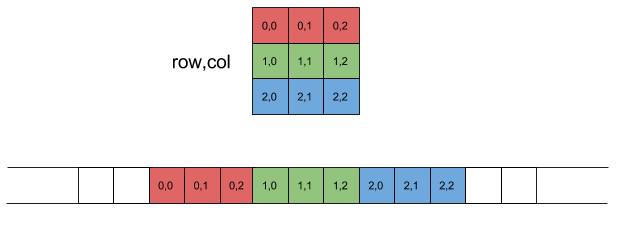
- In reality it's a single dimension array.
int A[2][3]={2,4,6,3,5,7}; // works same as A[2][3]={{2,4,6},{3,5,7}};
Access the Elements of a Multi-Dimensional Array :
- To access an element of a multi-dimensional array, specify an index number in each of the array's dimensions :
Change Elements in a Multi-Dimensional Array :
- To change the value of an element, refer to the index number of the element in each of the dimensions
Loop Through a Multi-Dimensional Array :
- To loop through a multi-dimensional array, we need one loop for each of the array's dimensions :
Why we need Multi-Dimensional Arrays?
- Multi-dimensional arrays are great at representing grids.
- Spatial Representation: In computer graphics, 2D and 3D arrays are commonly used to represent images and three-dimensional spaces, respectively. Each element in the array corresponds to a pixel.
Using Reference in Array
-
Reference : Giving another name to same value
int &x = y; // x is a reference to the variable y;
-// reference_in_array.cpp int array[5] = {1, 2, 3, 4, 5}; for (int i : array) { ++i; // will not change original value of array } for (int i : array) { cout << i << " "; // output : 1 2 3 4 5 } cout << endl; for (int &i : array) { // using Reference : Giving another name to same value ++i; // array value will also get modify } for (int i : array) { cout << i << " "; // output : 2 3 4 5 6 } // Using for each and reference in 2d array string array2D[2][3] = { {"00", "01", "02"}, {"10", "11", "12"} }; for (auto &i : array2D) { for (auto &j : i) { cout << j << " "; // output : 00 01 02, 10 11 12 } cout << endl; }for(int &x : array): This is a range-based for loop in C++. - The loop variable i is declared as a reference to an integer (int &i), meaning thatiwill refer directly to the actual elements in the containerarray, rather than creating a copy of them. -++i;: This line increments the value referred to byi. Sinceiis a reference to the elements in the containerarray, this operation modifies the original values in the array. - We can useautoinstead ofintif we don't know data type. This will not work on pointer. Work only on collection of values, like vector, list, et
Standard Template Library (STL) Arrays:
- C++ also provides the
std::arraytemplate class as part of the Standard Template Library: - Using
std::arrayprovides additional benefits, such as bounds checking and compatibility with other STL algorithms. -
In C++ Arrays have fixed sizes, and modifying their size requires creating a new array. If we need a dynamic-size array, consider using
std::vectorfrom the STL.