Operators
- Operators are used to perform operations on variables and values.
-
We use
+operator to add together two values :int x = 100 + 50;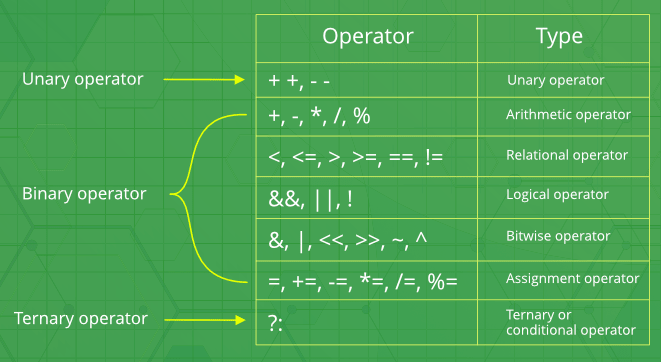
-
C++ divides the operators into the 5 groups :
Arithmetic operators
- Used to perform common mathematical operations.
+, -, *, /, %, ++, ---
Addition, Subtraction, Multiplication, Division, Modulus, Increment, Decrement
Increment/Decrement Operator :
- The increment operator adds 1 to the current value of the variable.
- The decrement operator subtract 1 to the current value of the variable.
- It can be used in both postfix and prefix forms.
Postfix (variable++) & Prefix (++variable) increment :
Assignment operators
- Used to assign values to variables.
=, +=, -=, *=, /=, %=, &=, |=, ^=, >>=, <<=
Comparison operators
- Used to compare variables.
- The return value of a comparison is either 1 or 0, which means true (1) or false (0).
- These values are known as Boolean values.
==, !=, >, <, >=, <=- Equal to, Not equal, Greater than, Less than, Greater than or equal to, Less than or equal to
Logical operators
- Used to perform logical operations on boolean values.
- The result of a logical operation is a boolean value, which can be either true or false.
&&is Logical and. Returns true if both statements are true.x < 5 && x < 10
||is Logical or. Returns true if one of the statements is true.x < 5 || x < 4
- ! is Logical not. Reverse the result, returns false if the result is true.
!(x < 5 && x < 10)
- These logical operators can be combined to create more complex logical expressions.
Bitwise operators
- Used to perform operations at the bit level.
-
These operators work on the individual bits of binary numbers.
AND (&) :
- Performs a bitwise AND operation between each pair of corresponding bits of a and b.
- Syntax :
x & y. The result is 1 only if both bits are 1.
OR (|) :
- Performs a bitwise OR operation between each pair of corresponding bits of a and b.
- Syntax :
x | y: The result is 1 if at least one of the bits is 1.
XOR (^) :
- Performs a bitwise exclusive OR (XOR) operation between each pair of corresponding bits of a and b.
- Syntax :
x ^ y. The result is 1 if the bits are different.
NOT (~) :
- Performs a bitwise NOT operation on each bit of a.
- Syntax :
~a. It flips each bit, changing 1s to 0s and vice versa.
Left Shift (<<) :
- Syntax :
x << n. Shifts the bits of a to the left by n positions. - The vacant positions on the right are filled with zeros.
Right Shift (>>) :
- Syntax :
x >> n. Shifts the bits of a to the right by n positions. - The vacant positions on the left are filled based on the sign bit for signed integers (arithmetic shift), or with zeros for unsigned integers (logical shift).
- Right Shift with Unsigned Integers (Logical Shift) :
- When you right-shift an unsigned integer, the behavior is called a logical shift.
- In a logical shift, vacant positions are filled with zeros, regardless of the sign bit.
unsigned int num = 8; // Binary: ...0000000000001000unsigned int result = num >> 1; // Result: ...0000000000000100 (zeros filled)
- Right Shift with Signed Integers (Arithmetic Shift) :
- When you right-shift a signed integer, the behavior is called an arithmetic shift.
- In an arithmetic shift, the sign bit (the leftmost bit) is used to fill the vacant positions created by the shift.
- If the sign bit is 1 (indicating a negative number), it will be replicated to fill the empty positions.
int num = -8; // Binary: ...1111111111111000int result = num >> 1; // Result: ...1111111111111100 (sign bit replicated)
// bitwise_operator.cpp :

unsigned int a = 5;  // Binary: 0101
unsigned int b = 3;  // Binary: 0011

// Bitwise AND
cout << (a & b) << endl;  // Output: 1 (Binary: 0001)

// Bitwise OR
cout << (a | b) << endl;  // Output: 7 (Binary: 0111)

// Bitwise XOR
cout << (a ^ b) << endl;  // Output: 6 (Binary: 0110)

// Bitwise NOT
cout << (~a) << endl;  // Output: 4294967290 (Binary: 11111111111111111111111111111010)

// Left Shift
cout << (a << 1) << endl;  // Output: 10 (Binary: 1010)

// Right Shift (a is unsigned so it's Logical Shift)
cout << (a >> 1) << endl;  // Output: 2 (Binary: 0010)

// Right Shift (num is signed so it's Arithmetic Shift)
int num = -8;  // Binary: ...1111111111111000`
cout << (num >> 1) << endl;  // Output: ...1111111111111100 (sign bit replicated)
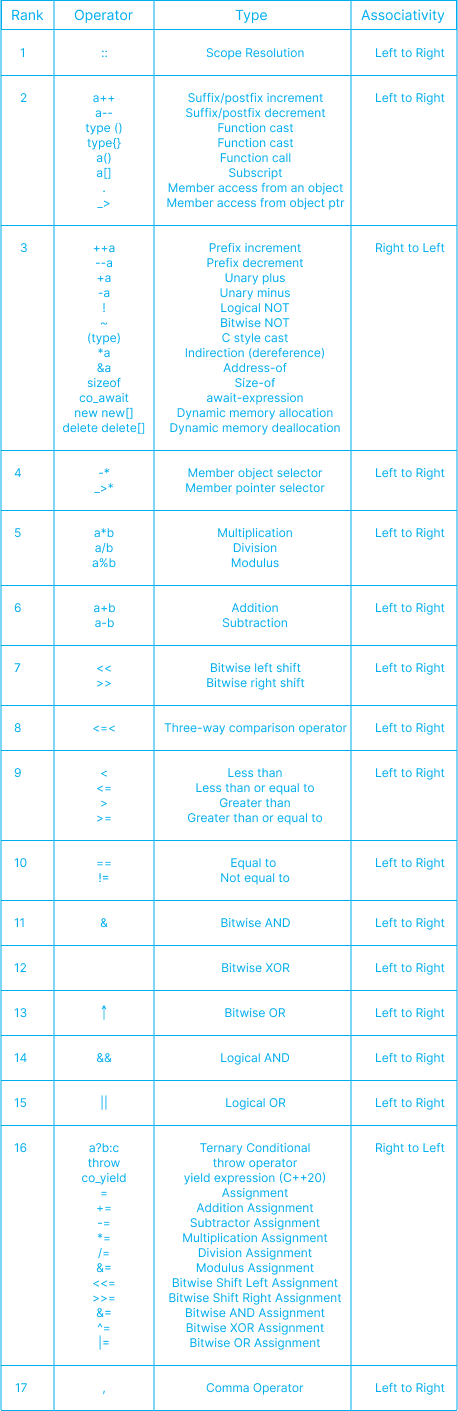
Operator Precedence
- Operator precedence determines the order in which operators are evaluated in an expression.
- When an expression contains multiple operators, the one with higher precedence is evaluated first.
-
If two operators have the same precedence, their associativity (left-to-right or right-to-left) determines the order of evaluation.
References :
- https://www.prepbytes.com/blog/cpp-programming/cpp-operator-precedence/